# 서버 점검 및 안정화 작업 안내

보다 안정적이고 쾌적한 서비스 이용을 위해 **서버 점검 및 안정화 작업**을 진행합니다.

📅 **일시:** 9월 6일 (일) 00:00 \~ 01:00

🛠️ **작업 내용:** 서버 점검 및 안정화 작업

👤 **대상:** PERSONAL 사용자

⚠️ **서비스 이용 안내:** 작업 시간 동안 서비스 이용이 **일시적으로 제한될 수 있습니다.**

더 안정적인 서비스를 제공해드리기 위한 작업인 만큼,\
잠시 불편하시더라도 너른 양해 부탁드립니다. 🙏

**감사합니다.**\
**토틀팀**


# 2026년 8월 14일

2026년 8월 토틀 업데이트

<figure><img src="https://3542602665-files.gitbook.io/~/files/v0/b/gitbook-x-prod.appspot.com/o/spaces%2FaJSVW5zMAUBkv4Bm8jDR%2Fuploads%2FpwveTXTGg5ndM5fKjSVl%2FProduct%20Update%20Email%20Banner.png?alt=media&amp;token=e86cbde8-4ec9-4f12-a75a-f008cf72de9d" alt=""><figcaption><p>2026년 8월 토틀 제품 업데이트</p></figcaption></figure>

## 2026년 8월 토틀 업데이트

언제나 토틀과 함께해주셔서 진심으로 감사드립니다. 😊

사용자 경험 향상을 위한 최신 업데이트 내용을 상세히 안내해 드립니다.

### **📎 \[퍼스널] 대용량 첨부 '다시보내기' 기능 추가**

이미 보내신 대용량 첨부파일을 다시 업로드할 필요 없이, 파일함에서 골라 바로 메일에 넣을 수 있습니다.

<figure><img src="https://3542602665-files.gitbook.io/~/files/v0/b/gitbook-x-prod.appspot.com/o/spaces%2FaJSVW5zMAUBkv4Bm8jDR%2Fuploads%2Ftkw0L9MeyOjvUdfqWOqB%2F2026-08-14%2014%2046%2029.png?alt=media&amp;token=60c8f6fb-fe16-4488-8358-8c0484b892c4" alt=""><figcaption></figcaption></figure>

* **이용 방법**: 메일 작성 중 파일함에서 기존에 보낸 파일을 선택하면, 해당 파일의 다운로드 링크가 본문에 자동으로 삽입됩니다.
* **개선 효과**: 같은 파일을 반복해서 보낼 때 재업로드에 소요되던 시간과 트래픽을 줄일 수 있습니다.
* **지원 환경**: Classic Outlook과 New Outlook(웹) 환경 모두 지원합니다.

### 💳 \[비즈니스] 관리자 페이지 '구독·결제' 메뉴 신설

관리자 페이지에서 구독과 결제 정보를 한곳에서 확인하고 관리하실 수 있도록 2개 메뉴가 추가되었습니다.

* **구독 현황**: 구독 갱신, 라이선스 추가, 해지를 관리자 페이지에서 직접 처리할 수 있습니다.
* **결제 내역**: 결제 영수증을 확인하고, 결제 안내메일 수신자를 변경할 수 있습니다.

<figure><img src="https://3542602665-files.gitbook.io/~/files/v0/b/gitbook-x-prod.appspot.com/o/spaces%2FaJSVW5zMAUBkv4Bm8jDR%2Fuploads%2Fxfl5Rp02KG3YSr4fFI8e%2F%EC%9D%B4%EB%AF%B8%EC%A7%80%20(2).png?alt=media&amp;token=da36843a-e1b4-48b2-998f-0e679126f3c6" alt=""><figcaption></figcaption></figure>

***

서비스 이용 중 궁금한 점이나 건의 사항이 있으시면 언제든지 고객지원팀으로 연락 주시기 바랍니다.


# \[공지] 연간 구독 프로모션 안내

'최대 40% 연간 구독 할인' 혜택을 확인해 보세요.

<figure><img src="https://3542602665-files.gitbook.io/~/files/v0/b/gitbook-x-prod.appspot.com/o/spaces%2FaJSVW5zMAUBkv4Bm8jDR%2Fuploads%2FOqyDTKwkq1ri4Ix4vjja%2FHeader%20(2).png?alt=media&amp;token=12eb3d39-701f-41dc-9a60-83c1c6c527a5" alt=""><figcaption></figcaption></figure>

**안녕하세요, 토틀입니다.**

먼저 그동안 토틀을 믿고 이용해 주신 사용자 여러분께 진심으로 감사의 말씀을 드립니다.

2026년 4월 1일부터는 [**유료 구독 기반의 전문적인 서비스로 개편**](/update-for-feb-2026/free-plan-sunset)될 예정입니다.\
이에 따라 기존 무료 버전 서비스는 종료되지만,\
오랫동안 저희를 아껴주신 사용자분들을 위해 특별한 <mark style="background-color:yellow;">**연간 구독 할인 프로모션**</mark>을 마련했습니다.

### 📢 연간 구독 특별 프로모션

* **기간**: 2026년 3월 17일(화) \~ 4월 30일(목)
* **대상**: 신규 및 기존 사용자 전체 (연간 구독 한정)
* **혜택**: 연간 구독 전 플랜 **최대 40% 할인**

<p align="center"><a href="https://totlelab.com/pricing" class="button primary" data-icon="angle-right">지금 바로 구독하기</a></p>

### 💵 프로모션 요금

연간 구독 시 적용되는 **프로모션 요금 (VAT 제외)**&#xC785;니다.

<table><thead><tr><th width="217.8570556640625" align="center">플랜</th><th width="147.4287109375" align="center">기존 연간 요금</th><th width="136.714111328125" align="center">프로모션 요금</th><th width="97.428466796875" align="center">할인율</th></tr></thead><tbody><tr><td align="center"><strong>퍼스널 (Personal)</strong></td><td align="center">50,000원/1년</td><td align="center"><strong>36,000원/1년</strong></td><td align="center"><strong>28% ↓</strong></td></tr><tr><td align="center"><strong>비즈니스 (Business)</strong></td><td align="center">120,000원/1년</td><td align="center"><strong>72,000원/1년</strong></td><td align="center"><strong>40% ↓</strong></td></tr><tr><td align="center"><strong>엔터프라이즈 (Enterprise)</strong></td><td align="center">150,000원/1년</td><td align="center"><strong>90,000원/1년</strong></td><td align="center"><strong>40% ↓</strong></td></tr></tbody></table>

<p align="center"><a href="https://totlelab.com/pricing" class="button primary" data-icon="angle-right">지금 바로 구독하기</a></p>

<p align="center"></p>

### 💳 이미 유료 구독 중이신가요?

구독 기간이 남아 있어도 걱정 없습니다. 같은 플랜으로 연간 구독하시면 **남은 기간에 1년이 추가 적립**됩니다.

### ⚠️ 유의 사항

* 본 프로모션 요금은 **2026년 4월 30일까지** 구독 신청을 완료하신 경우에만 적용됩니다.
* 프로모션 종료 후에는 기존 정상 요금으로 자동 전환되니 기간 내 혜택을 놓치지 마세요.
* 중도 해지 시 환불은 기존 [**서비스 약관** ](https://totlelab.com/termsandconditions)**기준**을 따릅니다.


# ⚠️토틀 무료버전 종료 안내

토틀 무료 버전 종료 및 전면 유료화 전환 안내 (2026.04.01 시행)

<figure><img src="https://3542602665-files.gitbook.io/~/files/v0/b/gitbook-x-prod.appspot.com/o/spaces%2FaJSVW5zMAUBkv4Bm8jDR%2Fuploads%2FAgxHNulyyACXWTN6JjRP%2Ftotle%20Popup%20(4).png?alt=media&amp;token=1bb6e6f3-b3ee-46e5-beca-9792c32529eb" alt=""><figcaption></figcaption></figure>

**안녕하세요 토틀팀입니다.**

토틀은 2017년 오피스플러그인으로 첫 서비스를 시작하여\
더 많은 분들께 스마트한 메일 환경을 제공하고자 <mark style="background-color:yellow;">**지난 10년간 무료 버전 운영**</mark>을 이어왔습니다.

하지만 최근 급변하는 IT 인프라 환경 속에서, 모든 사용자분들께 동일한 수준의 고품질 서비스를 안정적으로 제공하기 위해 깊은 고민 끝에 <mark style="background-color:yellow;">**2026년 4월 1일**</mark><mark style="background-color:yellow;">부로</mark> <mark style="background-color:yellow;"></mark><mark style="background-color:yellow;">**토틀 서비스**</mark><mark style="background-color:yellow;">의</mark> <mark style="background-color:yellow;"></mark><mark style="background-color:yellow;">**전면 유료화 전환**</mark>을 결정하게 되었습니다.

무료 버전 종료라는 쉽지 않은 결정을 내리게 된 배경과, \
향후 서비스 운영 방향을 아래와 같이 투명하게 안내드립니다.

### \[유료 서비스 통합 결정 배경]

#### 1. 보안 및 서비스 안정성 강화

비즈니스 커뮤니케이션 도구에서 가장 중요한 가치는 보안과 안정성입니다.\
고도화되는 **보안 위협에 선제적으로 대응**하고, 최신 **Microsoft Outlook 업데이트와의 완벽한 호환성을 지속적으로 유지**하기 위해 서비스 <mark style="background-color:yellow;">**운영 리소스를 안정성 강화에 집중**</mark>하고자 합니다.

#### 2. 서비스 지속 가능성 확보&#x20;

<mark style="background-color:yellow;">**지난 10년간**</mark> <mark style="background-color:yellow;">**인프라 운영 비용**</mark><mark style="background-color:yellow;">과</mark> <mark style="background-color:yellow;"></mark><mark style="background-color:yellow;">**기술 지원 비용은 꾸준히 증가**</mark>해 왔습니다.\
무료 버전 제공을 종료하고 수익 구조를 단일화함으로써, 기존 유료 고객과 새롭게 전환하시는 고객 모두에게\
보다 빠르고 **책임감 있는 기술 지원**과 **안정적인 서버 환경을 제공**할 수 있는 기반을 마련하고자 합니다.

### \[운영 정책 변경 안내]

* **시행 일자**: 2026년 4월 1일 (수)
* **변경 내용**: 무료 버전 서비스 제공 종료
* **데이터 보존**: 현재 사용 중인 모든 설정 및 데이터는 유료 플랜 전환 시 그대로 유지됩니다.

이번 결정은 토틀이 단순한 기능 제공 도구를 넘어, 여러분의 업무와 비즈니스를 안정적으로 뒷받침하는 신뢰할 수 있는 파트너로 지속되기 위한 약속이기도 합니다.

갑작스러운 정책 변경에 대해 너른 양해를 부탁드리며, 토틀 팀은 앞으로도 더욱 안정적이고 신뢰할 수 있는 서비스로 보답드리겠습니다.

### FAQ

<details>

<summary><strong>무료 버전은 언제까지 사용할 수 있나요?</strong></summary>

무료 버전은 2026년 3월 31일까지 이용 가능하며, 2026년 4월 1일부터 전면 유료 서비스로 전환됩니다.

</details>

<details>

<summary><strong>2026년 4월 1일 이후에는 무료로 사용할 수 있는 기능이 전혀 없나요?</strong></summary>

네. 해당 일자 이후에는 모든 기능이 유료 플랜으로 통합 운영되며, 무료 버전은 더 이상 제공되지 않습니다.

</details>

<details>

<summary><strong>왜 무료 버전을 종료하게 되었나요?</strong></summary>

보안과 서비스 안정성 강화를 위해서입니다. 최근 고도화되는 보안 위협 대응, Microsoft Outlook의 잦은 업데이트 대응, 안정적인 서버 운영과 신속한 기술 지원을 지속하기 위해 서비스 운영 구조를 **단일 유료 모델로 전환**하게 되었습니다.

</details>

<details>

<summary><strong>기존 무료 사용자도 유료로 전환해야 하나요?</strong></summary>

네. 2026년 4월 1일 이후 토틀을 계속 이용하시려면 **유료 플랜으로 전환**하셔야 합니다.

</details>

<details>

<summary><strong>유료 플랜으로 전환하면 기존 설정이나 데이터는 어떻게 되나요?</strong></summary>

기존에 사용 중이던\
• 개인 설정\
• 서비스 이용 데이터는 그대로 유지됩니다.\
유료 플랜 전환 시 별도의 데이터 이전이나 재설정은 필요하지 않습니다.

</details>

<details>

<summary><strong>유료 전환을 하지 않으면 데이터는 삭제되나요?</strong></summary>

유료 플랜으로 전환하지 않으실 경우, 서비스 운영 정책에 따라 **2026년 4월 1일로부터 1년 후 기존의 모든 데이터가 영구 삭제될 예정**입니다. 소중한 정보가 유실되지 않도록 해당 기간 내에 플랜 전환 또는 개별 데이터 백업을 완료해 주시기 바랍니다.

</details>

<details>

<summary><strong>유료 플랜 요금과 종류는 어디에서 확인할 수 있나요?</strong></summary>

유료 플랜의 상세 요금은 [Pricing 페이지](https://totlelab.com/pricing)에서 확인하실 수 있습니다.

</details>

<details>

<summary><strong>기존 유료 고객에게 변경되는 사항도 있나요?</strong></summary>

기존 유료 고객의 요금 및 계약 조건에는 변동이 없으며,\
이번 정책 변경을 통해

* 더 안정적인 서비스 환경
* 더욱 빠른 기술 지원
* 강화된 보안 체계의 혜택을 제공받으실 수 있습니다.

</details>

<details>

<summary><strong>기업·다수 계정 사용자의 경우 별도 상담이 가능한가요?</strong></summary>

네. 기업 고객 및 다수 계정 이용 고객을 위한 맞춤 플랜 및 별도 상담이 가능합니다.\
고객센터 또는 영업팀을 통해 문의해 주세요.

[\[문의하기\]](https://tally.so/r/31YQy1)

</details>

<details>

<summary><strong>추가 문의는 어디로 하면 되나요?</strong></summary>

토틀 [고객센터](https://totle.channel.io/home)를 통해 언제든 문의해 주시면 담당자가 상세히 안내드리겠습니다.

</details>

**감사합니다.**\
**토틀팀**


# 🏆토틀, ISO 27001 · 27701 보안 인증 취득

“고객님의 소중한 데이터, 글로벌 수준의 체계로 더 안전하게 보호합니다.”

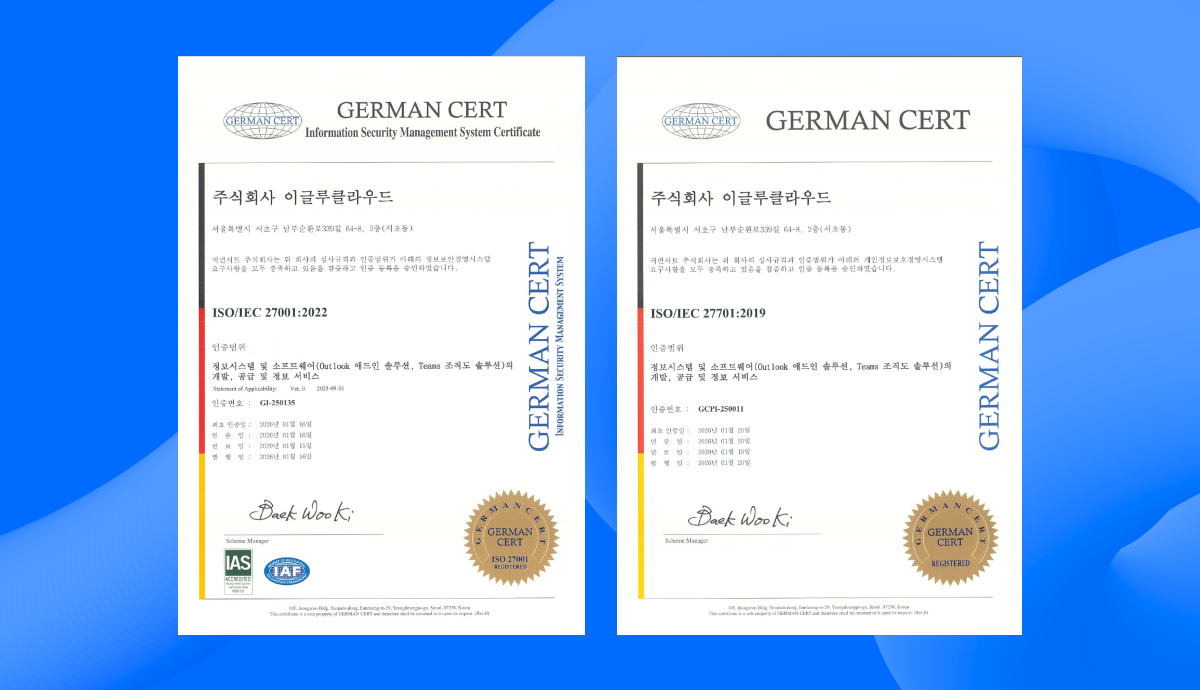
<figure><img src="https://3542602665-files.gitbook.io/~/files/v0/b/gitbook-x-prod.appspot.com/o/spaces%2FaJSVW5zMAUBkv4Bm8jDR%2Fuploads%2FvbA0fr8mYbx9iBiCTXet%2FISO%2027001%20Certification.png?alt=media&amp;token=2f73c08e-33e5-456b-bd49-51e2ad71a5cc" alt=""><figcaption><p>토틀, ISO 27001(정보보안경영시스템) 및 ISO 27701(개인정보보호경영시스템) 인증 취득</p></figcaption></figure>

**'토틀'**&#xC774; 정보보안 및 개인정보보호 분야의 가장 권위 있는 국제 표준인 **ISO 27001(정보보안경영시스템)**&#xACFC; **ISO 27701(개인정보보호경영시스템) 인증을 공식 취득**했습니다.

### 📋 인증 세부 정보

<figure><img src="https://3542602665-files.gitbook.io/~/files/v0/b/gitbook-x-prod.appspot.com/o/spaces%2FaJSVW5zMAUBkv4Bm8jDR%2Fuploads%2FlT2ZWFvpjRTygxwXitpA%2FISO%2027001%2C%2027701%20Certification.png?alt=media&amp;token=97a4e5ff-2d81-4f47-8a3a-c58b5883d105" alt=""><figcaption></figcaption></figure>

* **인증 표준**: ISO/IEC 27001:2022, ISO/IEC 27701:2019
* **인증 범위**: 정보시스템 및 소프트웨어(Outlook 애드인 솔루션, Teams 조직도 솔루션)의 개발, 공급 및 정보 서비스
* **인증 기관**: 저먼서트
* **인증 일자**: 2026.01.16 (ISO 27001), 2026.01.20 (ISO 27701)

### 🔐 이번 인증이 갖는 의미

ISO 27001과 ISO 27701은 전 세계적으로 인정받는 정보보안 및 개인정보보호 표준으로, 엄격한 심사 기준과 지속적인 관리 체계를 요구합니다. 이번 인증 취득은 토틀이 다음과 같은 역량을 갖추었음을 제3자 인증기관으로부터 공식 검증받았음을 의미합니다:

#### 정보보안 강화 (ISO 27001)

* 체계적인 보안 관리 프레임워크 구축 및 운영
* 정보자산에 대한 리스크 평가 및 통제 체계 확립
* 보안 사고 예방 및 대응 프로세스 구축
* 지속적인 보안 수준 모니터링 및 개선

#### 개인정보보호 강화 (ISO 27701)

* GDPR, 개인정보보호법 등 글로벌 개인정보 규제 준수
* 개인정보 수집·이용·보관·파기 전 과정의 투명한 관리
* 정보주체의 권리 보장을 위한 체계적 절차 마련
* 개인정보 처리에 대한 책임성 강화

### 🤝 고객 여러분께 드리는 약속

이번 인증은 단순한 형식적 취득이 아닌, 토틀이 고객 여러분의 데이터를 최우선으로 보호하기 위해\
기울여온 지속적인 노력의 결과입니다.

**토틀은 앞으로도**:

* 국제 표준에 부합하는 **보안 체계를 지속적으로 유지·개선**하고
* **최신 보안 위협에 선제적으로 대응**하며
* **고객 데이터 보호를 위한 투자와 노력**을 아끼지 않겠습니다.

앞으로도 토틀은 여러분이 안심하고 사용할 수 있는 신뢰할 수 있는\
비즈니스 메일 환경을 제공하기 위해 **보안과 개인정보 보호를 최우선으로 운영**하겠습니다.

**감사합니다.**\
**토틀팀**


# 🍁2025년 11월 21일

2025년 11월 토틀 업데이트

<figure><img src="https://3542602665-files.gitbook.io/~/files/v0/b/gitbook-x-prod.appspot.com/o/spaces%2FaJSVW5zMAUBkv4Bm8jDR%2Fuploads%2FpJpSD6Eo7nZz5fnNVh8f%2FProduct%20Update%20Email%20Banner.png?alt=media&amp;token=62c7ceca-cb06-4221-a864-013bbef5cb28" alt=""><figcaption></figcaption></figure>

## 2025년 11월 토틀 업데이트

언제나 토틀과 함께해주셔서 진심으로 감사드립니다. 😊\
사용자 경험 향상을 위한 최신 업데이트 내용을 상세히 안내해 드립니다.

### ✅ New Outlook 수신확인 기능 안정화

* **문제해결**: New Outlook(OWA) 환경에서 간헐적으로 수신확인 기능이 정상 작동하지 않던 문제를 해결하고 기능을 복구했습니다
* **개선 효과**: 이제 모든 Outlook 환경(Classic, New, OWA)에서 **수신확인 기능**을 **더욱 안정적으로이용하**실 수 있습니다.

### 📝 메모기능 제공 범위 변경

Microsoft의 애드인 정책 변경으로 인해 **New Outlook 및 OWA 환경에서는 메모 기능 제공이 중단**됩니다. Classic Outlook에서는 기존과 동일하게 메모 기능을 계속 이용하실 수 있습니다.

* **제공 중단** : **New Outlook** 및 **Outlook Web App (OWA)**
* **정상 제공** : Classic Outlook (데스크톱 버전)

{% hint style="warning" %}
**중요 안내**: 기존에 작성하신 메모 데이터는 안전하게 보관됩니다. New Outlook 사용자를 위해 메모 기능을 대체할 수 있는 방안을 신속하게 검토 및 마련 중이며, 확정되는 대로 다시 공지하겠습니다.
{% endhint %}

### ⚡서버 안정성 개선

* **개선 내용**: 서비스 성능을 최적화하고 잠재적인 오류를 방지하기 위한 서버 인프라 개선 작업을 완료했습니다.&#x20;
* **개선 효과**: 토틀 서비스를 **더욱 빠르고 안정적으로 이용**하실 수 있습니다.

***

서비스 이용 중 궁금한 점이나 건의 사항이 있으시면 언제든지 [**고객지원팀으로 연락**](https://totle.channel.io/home) 주시기 바랍니다.


# 🌱 2025년 3월 11일

2025년 3월 토틀 업데이트

<figure><img src="https://3542602665-files.gitbook.io/~/files/v0/b/gitbook-x-prod.appspot.com/o/spaces%2FaJSVW5zMAUBkv4Bm8jDR%2Fuploads%2FiI9QucbsRKVUuIcNtStq%2FProduct%20Update%20Email%20Banner-min.png?alt=media&amp;token=c4ae8b25-9e92-47d1-b809-b7ad00c1ce01" alt=""><figcaption><p>2025년 3월 토틀 업데이트</p></figcaption></figure>

## 🌱 2025년 3월 토틀 업데이트

안녕하세요, 토틀팀입니다!

🌸 따스한 봄기운이 느껴지는 3월, 토틀 사용자 여러분 모두 건강하게 지내고 계신가요?\
2025년 3월, 토틀의 새로운 기능과 개선사항을 소개해 드립니다.

### 📨 MAPI 프로토콜 지원

<figure><img src="https://3542602665-files.gitbook.io/~/files/v0/b/gitbook-x-prod.appspot.com/o/spaces%2FaJSVW5zMAUBkv4Bm8jDR%2Fuploads%2FZxZ7j1zjaBeeeXdbv3Ob%2F%EC%95%84%EC%9B%83%EB%A3%A9%20%EA%B3%84%EC%A0%95%EC%84%A4%EC%A0%95.png?alt=media&amp;token=0afe0ea0-e267-4c84-8cb7-6c5d9210cc8b" alt="" width="518"><figcaption><p>토틀 MAPI 프로토콜 지원</p></figcaption></figure>

* 이제 **MAPI(Messaging Application Programming Interface)** 계정에서도 토틀을 완벽하게 이용하실 수 있습니다.

> MAPI는 마이크로소프트의 프로토콜로, 아웃룩에서 Exchange 서버의 이메일, 주소록, 달력, 공용 폴더 등에 쉽게 접근할 수 있게 해줍니다.

{% hint style="danger" %}
MAPI 계정 사용 시 **'개별 발송'** 및 **'매크로 발송'** 기능 사용이 제한됩니다.
{% endhint %}

### 🔄 Google Workspace 호환성 개선

<figure><img src="https://3542602665-files.gitbook.io/~/files/v0/b/gitbook-x-prod.appspot.com/o/spaces%2FaJSVW5zMAUBkv4Bm8jDR%2Fuploads%2F2Cd3gulFDE7UFfw9o0kH%2F%EA%B5%AC%EA%B8%80%20-%20%EB%8F%99%EA%B8%B0%ED%99%94%20%EC%83%81%ED%83%9C.png?alt=media&amp;token=052a9c1c-392e-4b94-ad6c-529062dfd259" alt="" width="563"><figcaption></figcaption></figure>

* Outlook에 **Google Workspace Sync** 를 설치한 사용자분들도 토틀의 기능을 사용하실 수 있어요.
* 구글 계정과 아웃룩을 함께 사용하시는 분들도 이제 토틀의 모든 기능을 누려보세요.

### 💳 구독 계정 정보 표시

<figure><img src="https://3542602665-files.gitbook.io/~/files/v0/b/gitbook-x-prod.appspot.com/o/spaces%2FaJSVW5zMAUBkv4Bm8jDR%2Fuploads%2FgL2dCeauzZzDDVpsaARc%2F%EA%B0%99%EC%9D%80%20%EB%A9%94%EC%9D%BC%20%EA%B5%AC%EB%8F%85.png?alt=media&amp;token=cfaf87a4-6d14-4179-b0ab-42c71ef32fdb" alt="" width="563"><figcaption><p>토틀 구독 계정 정보 표시</p></figcaption></figure>

* 여러 계정으로 토틀을 구독하고 계신 분들을 위해, 로그인 시 현재 어떤 계정으로 접속 중인지 바로 확인할 수 있습니다.
* 특히 같은 이메일로 Personal과 Business 계정을 모두 구독 중이신 분들께 매우 유용한 기능입니다.

### 📂 파일 확장자 별 정렬

<figure><img src="https://3542602665-files.gitbook.io/~/files/v0/b/gitbook-x-prod.appspot.com/o/spaces%2FaJSVW5zMAUBkv4Bm8jDR%2Fuploads%2FcgdbYrhrxtJLpRLydv6O%2F%ED%8C%8C%EC%9D%BC%ED%99%95%EC%9E%A5%EC%9E%90%20%EC%88%9C%20%EC%A0%95%EB%A6%AC.png?alt=media&amp;token=20b51a13-f022-41dc-a48c-ec3886e20e8d" alt=""><figcaption></figcaption></figure>

* 이제 대용량 파일 첨부 시 **파일 확장자(.txt, .pdf, .jpg 등)별로 정렬**하여 볼 수 있습니다.
* 같은 유형의 파일들을 한눈에 확인하고, 원하는 파일을 더 빠르게 찾을 수 있습니다.

***

새롭게 향상된 토틀로 더욱 원활한 업무 환경을 경험해보세요!&#x20;

업데이트 관련 문의사항이 있으시면 언제든지 [**고객센터**](https://totle.channel.io/home)로 연락 주시기 바랍니다. 🚀✨


# ENTERPRISE 최신 버전 업데이트 안내

2025년 Enterprise 플랜 고객 대상 업데이트 안내

<figure><img src="https://3542602665-files.gitbook.io/~/files/v0/b/gitbook-x-prod.appspot.com/o/spaces%2FaJSVW5zMAUBkv4Bm8jDR%2Fuploads%2FC79Uwa8y38YnHxpb1leQ%2FProduct%20Update%20-Jan%202025%20(1).png?alt=media&amp;token=0d2e0188-fcda-4dcb-ba9b-b15d6af7d692" alt=""><figcaption></figcaption></figure>

## 토틀 업데이트 안내

안녕하세요, 토틀을 이용해 주시는 고객님께 감사드립니다.

토틀을 더욱 편리하고 효율적으로 사용하실 수 있도록, 저희는 끊임없이 서비스를 개선하고 있습니다.\
2025년 새해를 맞아 Enterprise 고객님들을 위해 **최신 버전의 토틀**을 제공해드리고자 합니다.

## 업데이트 신청 방법

* 최신 버전으로의 업데이트를 원하시는 경우, 별도로 발송된 이메일 내  **\[업데이트신청하기]** 링크를 통해 신청 부탁드립니다.

## 주요 업데이트 내용

### 1. 피싱 사이트 탐지 기능 🛡️

<div align="left"><figure><img src="https://3542602665-files.gitbook.io/~/files/v0/b/gitbook-x-prod.appspot.com/o/spaces%2FaJSVW5zMAUBkv4Bm8jDR%2Fuploads%2FDhapxfCaFzofXWaF72Pc%2FMalicious%20Link%20Checker%20(KO).gif?alt=media&amp;token=32123663-f548-428d-abfd-5f91f77b75a0" alt="" width="563"><figcaption><p>악성 사이트 탐지기</p></figcaption></figure></div>

* **피싱 메일 위협 차단**을 위해, 메일 링크 클릭 시 자동으로 피싱 사이트를 검사하고 **위험 감지 시 경고 메시지를 표시**하는 보안 기능을 도입했습니다.

{% embed url="<https://totlelab.com/maliciouslinkchecker>" %}
토틀 악성 사이트 탐지기
{% endembed %}

### 2. 사용자 인터페이스 개선 🎨

<div align="left"><figure><img src="https://3542602665-files.gitbook.io/~/files/v0/b/gitbook-x-prod.appspot.com/o/spaces%2FaJSVW5zMAUBkv4Bm8jDR%2Fuploads%2FBya4H2SyjHPE2sLJo41M%2F%EC%95%84%EC%9D%B4%EC%BD%98%20%EA%B0%9C%EC%84%A0.png?alt=media&amp;token=4f892655-6d04-45c4-b417-5f232bb2a262" alt=""><figcaption><p>토틀 주요 아이콘 디자인 개선</p></figcaption></figure></div>

* 자주 사용하는 아이콘들의 디자인을 개선하여 더욱 직관적이고 식별하기 쉽게 변경했습니다.
* 전반적인 UI를 더욱 깔끔하게 개선하여 업무 효율성을 높였습니다.

### 3. 메일 수신 확인 기능 강화 ✉️

<div align="left"><figure><img src="https://3542602665-files.gitbook.io/~/files/v0/b/gitbook-x-prod.appspot.com/o/spaces%2FaJSVW5zMAUBkv4Bm8jDR%2Fuploads%2FyZqPnieZg0SY0El2m3Ba%2F%EC%88%98%EC%8B%A0%ED%99%95%EC%9D%B8.png?alt=media&amp;token=c9f31dbc-8d67-428f-88fc-5ffbcb34587f" alt="" width="563"><figcaption><p>토틀 메일 수신확인 기능 강화</p></figcaption></figure></div>

* **메일 검색** 🔍: 수신확인이 필요한 메일을 더욱 쉽게 찾을 수 있도록 **검색 기능을 개선**했습니다.
* **수신확인 내역 내보내기**📥: 수신 확인 목록을 **Excel 파일로 내보낼 수** 있어 별도 관리가 가능합니다.
* **UI 개선** 👀: 수신 확인 현황을 한눈에 파악할 수 있도록 **화면 구성을 개선**했습니다.

### 4. 대용량 파일함 기능 개선 📁

<div align="left"><figure><img src="https://3542602665-files.gitbook.io/~/files/v0/b/gitbook-x-prod.appspot.com/o/spaces%2FaJSVW5zMAUBkv4Bm8jDR%2Fuploads%2F9V2iTWQ4jdacd0mpP3IX%2F%EB%8C%80%EC%9A%A9%EB%9F%89%20%ED%8C%8C%EC%9D%BC%ED%95%A8.png?alt=media&amp;token=9fbbb890-66b3-45dc-bf54-cfbda76a5b91" alt="" width="563"><figcaption><p>토틀대용량 첨부 파일함 기능 및 UI 개선</p></figcaption></figure></div>

* **파일 검색** 🔍: 파일 검색 속도와 정확도를 높여 원하는 **파일을 빠르게 찾을 수** 있습니다.
* **파일 목록 내보내기**📥: 대용량첨부파일 목록을 **Excel로 내보내기**할 수 있어 첨부한파일의체계적인 관리가 가능합니다.
* **스토리지 관리** 🗃️: 현재 사용량과 **남은 용량을 실시간으로 확인**할 수 있습니다.
* **UI 개선** 👀: 파일 관리가 더욱 편리하도록 **화면 구성을 개선**했습니다.

### 5. HTML 메일 작성 기능 향상 ✏️

<div align="left"><figure><img src="https://3542602665-files.gitbook.io/~/files/v0/b/gitbook-x-prod.appspot.com/o/spaces%2FaJSVW5zMAUBkv4Bm8jDR%2Fuploads%2F5pGHCJd03SfhbS612GWG%2FHTML%20%EB%A9%94%EC%9D%BC%20%EC%9E%91%EC%84%B1.png?alt=media&amp;token=c2400b8e-8c62-4b31-a821-66f62c1a2368" alt="" width="563"><figcaption><p>토틀HTML 소스 보기 기능 개선</p></figcaption></figure></div>

* **HTML 소스 보기 기능**을 개선하여 HTML 메일 작성 시 더욱 편리하게 활용할 수 있습니다.
* 코드 가독성이 향상되어 **HTML 메일 템플릿📝 관리가 용이**해졌습니다.

## 피드백 및 문의

### 사용 후기 공유 📢

* 새로운 버전을 사용하시면서 느끼신 점이나 불편한 점을 자유롭게 공유해 주세요.
* 제품 개선을 위한 아이디어나 새로운 기능 제안도 환영합니다.

### 고객 지원 💪

* 사용 중 궁금하신 점이나 기술적인 문의사항이 있으시면 언제든 연락 주세요.
* 고객님의 소중한 피드백은 더 나은 서비스를 만드는 원동력이 됩니다.
* [**고객지원 문의하기 📮**](https://totle.channel.io/home)

**감사합니다.**\
**토틀팀**


# 2024년 10월 17일

2024년 10월 토틀 업데이트

<figure><img src="https://3542602665-files.gitbook.io/~/files/v0/b/gitbook-x-prod.appspot.com/o/spaces%2FaJSVW5zMAUBkv4Bm8jDR%2Fuploads%2F9WVIF2pQLtk28PhFUm9E%2FProduct%20Update%20Email%20Banner%20(2)-min.png?alt=media&amp;token=2a9af623-7aea-4396-843c-d05d6f1ad283" alt=""><figcaption><p>2024년 10월 토틀 제품 업데이트</p></figcaption></figure>

## 🚀 **2024년 10월 토틀 업데이트**

{% hint style="info" %}
**안녕하세요 토틀팀입니다!**\
날씨가 쌀쌀해지는 요즘🍂, 잘 지내고 계신가요?\
토틀도 한층 더 업그레이드 되어 여러분을 찾아왔답니다.\
이번 달 업데이트 소식, 함께 살펴볼까요? 😊
{% endhint %}

## **⚡ 대용량 첨부 업로드 및 다운로드 속도 개선**

* 파일 업로드 시 <mark style="background-color:yellow;">**자동 압축 기능**</mark>이 추가되었습니다.
* 압축되지 않은 파일은 **자동으로 압축 후 전송**됩니다.
* 이를 통해 파일 크기가 줄어 <mark style="background-color:yellow;">**업로드 성능이 개선**</mark>될 것으로 기대됩니다.

## 🚨 **구 버전 사용 중지 안내**

* &#x20;버전 \[1.1.235.327] 이하는 <mark style="background-color:yellow;">**11월 1일부터 사용이 중지⛔**</mark>됩니다.
* 2023년 9월 이후 업데이트를 하지 않으신 사용자께서는 반드시\ <mark style="background-color:yellow;">**최신 버전으로 업데이트**</mark><mark style="background-color:yellow;">🔄</mark> 해 주시기 바랍니다.

새롭게 업데이트 한 토틀을 활용해 이제 더 쾌적하게 작업하실 수 있을 거예요.\
업데이트하는 데 **도움이 필요하시면 언제든 연락** 주세요. 🏃‍♂️💨


# 2024년 8월 28일

🎉 8월 토틀 업데이트

<figure><img src="https://3542602665-files.gitbook.io/~/files/v0/b/gitbook-x-prod.appspot.com/o/spaces%2FaJSVW5zMAUBkv4Bm8jDR%2Fuploads%2FMThFFd0Xk5pYljTRrt9A%2FProduct%20Update%20Email%20Banner_AUG.png?alt=media&amp;token=4faf0f5a-d50f-4e1f-8b77-76427ce50331" alt=""><figcaption><p>totle August Product Update</p></figcaption></figure>

### **8월의 신선한 바람과 함께 찾아온 업데이트 소식! 🍃**

우리 서비스가 어떻게 새로워졌는지 함께 살펴보세요!

***

### 📸 **토틀 OWA, 메일 서식 이미지 저장 문제 해결!**

<figure><img src="https://3542602665-files.gitbook.io/~/files/v0/b/gitbook-x-prod.appspot.com/o/spaces%2FaJSVW5zMAUBkv4Bm8jDR%2Fuploads%2F3UPvaEDH889ldDLk4kE5%2Ftotle%20OWA%20image%20KO.gif?alt=media&amp;token=c22501ad-a842-45ee-aeb8-087179874e79" alt=""><figcaption><p>totle OWA Email Template Issue Resolved</p></figcaption></figure>

**8월29일부터**, **토틀 아웃룩 OWA** 버전에서 메일 서식 저장 시 **이미지가 정상적으로 저장되지 않던 문제가 완벽히 해결됩니다.** 🎊

📝 아웃룩 OWA에서 저장된 서식을 클릭할 때, **삽입된 이미지가 누락되지 않고 정상적으로 적용됩니다!** 👏

이제 오류 없이 아웃룩 OWA에서도 메일 서식을 편리하게 이용하세요!

***

### 📦 **대용량 파일 전송, 이제 더 빠르게!**

**아웃룩 OWA와 데스크톱 버전에서 대용량 첨부 파일 전송 속도가 크게 개선되었습니다.** 이제 파일 전송이 더 빠르고 효율적으로 이루어집니다! 😎

• **더 빠른 전송 속도:** 대용량 파일의 업/다운로드가 한결 **빨라졌어요.** ⚡

• **즉시 공유 가능:** 중요한 파일도 **지연 없이** 바로 전송할 수 있어요. 📥&#x20;

• **업무 효율 업:** 전송 속도가 빨라져서 일 **처리가 훨씬 더 매끄러워졌어요!** 🎈

지금 새롭게 향상된 전송 속도를 직접 체험해 보세요!

***

### **여러분의 아이디어로 토틀을 더 멋지게! 💡** <a href="#undefined-4" id="undefined-4"></a>

토틀은 여러분이 더 편하게, 더 즐겁게 서비스를 이용하실 수 있도록 항상 고민하고 있어요.

혹시 **"이것도 개선해 주면 좋겠어!"**&#xD558;는 아이디어가 있다면 언제든 [**\[여기\]**](https://forms.office.com/Pages/ResponsePage.aspx?id=QnzjJCmrKUikD9_iXXV2VmiSh1jsyPJFopZ6d71w-fZUNDgyVDVZSjA2M1VaNVZWRzRWWFpVQzJKUy4u) 에 남겨주세요.

여러분의 의견이 우리 서비스를 더욱 멋지게 만들거든요! 💡


# \[주요공지]  토틀 고객지원 휴무 안내

안녕하세요, totle입니다.&#x20;

항상 totle을 선택해 주셔서 진심으로 감사드립니다.

**2024년 08월 16일 (금)** 더 나은 서비스 제공을 위한 내부 직원 교육 일정으로 인해&#x20;

고객 상담 서비스가 <mark style="color:blue;">**하루 동안 운영되지 않음을 안내드립니다**</mark>.

{% hint style="warning" %}
**고객 지원 휴무 일정: 2024년 08월 16일 (금) - 1일간**
{% endhint %}

휴무 동안 <mark style="color:blue;">**실시간 채팅 및 전화 상담이 불가능하오니**</mark> 양해 부탁드립니다.&#x20;

**AI 상담봇 및 FAQ/가이드는 언제든지 이용하실 수 있으니** 많은 활용 부탁드립니다.

문의 사항을 남겨 주시면, **19일 (월) 복귀 후** 신속히 안내해드리겠습니&#xB2E4;**.**

고객님께 만족스러운 서비스를 제공하기 위해 더욱 노력하겠습니다.&#x20;

감사합니다.


# 2024년 7월 29일

🎉 2024년 7월 토틀 업데이트

<figure><img src="https://3542602665-files.gitbook.io/~/files/v0/b/gitbook-x-prod.appspot.com/o/spaces%2FaJSVW5zMAUBkv4Bm8jDR%2Fuploads%2Fj2p39AX3cS7LQzjSEJuR%2F%5B%ED%86%A0%ED%8B%80%5D7%EC%9B%94%20%ED%94%84%EB%A1%9C%EB%8D%95%20%EC%97%85%EB%8D%B0%EC%9D%B4%ED%8A%B8_%EB%89%B4%EC%8A%A4%EB%A0%88%ED%84%B0%20%ED%97%A4%EB%8D%94_%EC%88%98%EC%A0%95_0729-min.jpg?alt=media&amp;token=e832edb2-9ae1-4cf3-8fa0-beb90de200d4" alt="토틀 7월 Product Update"><figcaption><p>2024년 7월 토틀 Product Update</p></figcaption></figure>

## 7월의 뜨거운 태양만큼 핫한 **업데이트 소식**을 들고 왔어요. 🙌&#x20;

이번 달 우리 서비스가 어떻게 더 좋아졌는지 함께 살펴볼까요?

***

## **🚀 토틀, 더 빠르고 안정적으로!**

더욱 원활하고 쾌적하게 토틀을 사용하실 수 있도록 **서버 안정화 작업**을 통해 **속도 개선과 오류를 줄였어요**!

• 서비스가 한결 빨라졌어요. ⚡&#x20;

• 접속 오류를 반으로 줄였어요. 이제 오류 없이 즐기세요!&#x20;

• 많은 사람들이 한꺼번에 몰려도 거뜬해요. 북적북적해도 문제 없어요!

***

## **🔐 Google 로그인 UI 새단장**

**Google이 로그인 문을 새로 단장했어요**. 토틀도 이에 발맞춰 새단장 했답니다! 😎

사용자 중심의 인터페이스로 로그인 과정이 한결 간편하고 직관적으로 개선되었어요.

***

## **🎁 토틀 유저를 위한 특별 혜택**

### [**"로고팝" 무료 체험 기회**](https://logopop.web.app/#/totle)**를 지금 바로 잡으세요!**

<figure><img src="https://3542602665-files.gitbook.io/~/files/v0/b/gitbook-x-prod.appspot.com/o/spaces%2FaJSVW5zMAUBkv4Bm8jDR%2Fuploads%2FHITtOLGgUIyy3d8kZgMb%2FLogopopvideo-ezgif.com-video-to-gif-converter%20(1).gif?alt=media&amp;token=4d03829f-938f-494c-a16a-e1253f2c2525" alt=""><figcaption><p>로고를 다양한 테마로 변신시켜주는 AI 솔루션 "로고팝(LOGOPOP)"</p></figcaption></figure>

단 몇 초 만⚡에 여러분의 로고를 다양한 테마로 변신시켜주는 혁신적인 AI 솔루션, [**로고팝을 무료로 체험해보세요**](https://logopop.web.app/#/totle)**.**[ ](https://logopop.web.app/#/totle)\
기존 로고를 새롭고 신선한 디자인으로 탈바꿈시키는 마법을 경험하실 수 있습니다.🎨✨

지금 바로 **로고팝**의 **놀라운 기능을 경험해보세요!** 🎆

{% embed url="<https://logopop.web.app/#/totle>" %}

### 로고팝 사용 방법 알아보기

{% embed url="<https://slashpage.com/logopop>" %}

***

## **여러분의 아이디어로 토틀을 더 멋지게! 💡**

토틀은 여러분이 더 편하게, 더 즐겁게 서비스를 이용하실 수 있도록 항상 고민하고 있어요.&#x20;

혹시 **"이것도 개선해 주면 좋겠어!"**&#xD558;는 아이디어가 있다면 언제든 [**\[여기\]**](https://forms.office.com/Pages/ResponsePage.aspx?id=QnzjJCmrKUikD9_iXXV2VmiSh1jsyPJFopZ6d71w-fZUNDgyVDVZSjA2M1VaNVZWRzRWWFpVQzJKUy4u) 에 남겨주세요.&#x20;

여러분의 의견이 우리 서비스를 더욱 멋지게 만들거든요! 💡


# 2024년 6월 27일

🎉 2024년 6월 토틀 업데이트

<figure><img src="https://3542602665-files.gitbook.io/~/files/v0/b/gitbook-x-prod.appspot.com/o/spaces%2FaJSVW5zMAUBkv4Bm8jDR%2Fuploads%2FzFLuIn0M4yxA4TMewpOQ%2F24%20May%20Product%20Update%20Email%20Banner.png?alt=media&amp;token=dc53b52b-e5b2-4c03-84b5-e1faed930c38" alt="totle Product Update_2024.06"><figcaption></figcaption></figure>

## 더 나은 업무 환경을 만들기 위해 늘 노력하는 토틀팀입니다.

이번 6월 업데이트의 주인공은 AI 메일 템플릿 '[**토틀랩**](https://totlelab.us/ko)' 인데요.\
지난 5월에 이어 어떤 기능들이 추가로 개선되었을지,\
바로 소개해드리겠습니다!

{% embed url="<https://totlelab.us/ko>" %}

***

## 🔓 토틀랩 <mark style="color:blue;">로그인 페이지</mark> 활성화&#x20;

<figure><img src="https://3542602665-files.gitbook.io/~/files/v0/b/gitbook-x-prod.appspot.com/o/spaces%2FaJSVW5zMAUBkv4Bm8jDR%2Fuploads%2FzhR368RIjaEp58UqWM2i%2F%EB%A1%9C%EA%B7%B8%EC%9D%B8%20%EA%B3%BC%EC%A0%95%20GIF_%EA%B5%AD%EB%AC%B8.gif?alt=media&amp;token=3822ca22-ae7b-4647-bd6f-8b7b5dc21310" alt="totlelab_Login page"><figcaption></figcaption></figure>

이제 토틀랩에서도 <mark style="color:blue;">**토틀 아이디**</mark>로 로그인을 할 수 있게 됩니다!

로그인 페이지는 추후 <mark style="color:blue;">**토틀 마이페이지**</mark>와 통합될 예정으로,\
한 곳에서 나의 계정 관리와 데이터 조회가 모두 가능하도록 준비하고 있답니다.

***

### 💬 빠르게 문의해요! <mark style="color:blue;">채팅 상담</mark> 기능 추가

<figure><img src="https://3542602665-files.gitbook.io/~/files/v0/b/gitbook-x-prod.appspot.com/o/spaces%2FaJSVW5zMAUBkv4Bm8jDR%2Fuploads%2FoMJvjNEvYas4Ml55yAMt%2F%EC%B1%84%EB%84%90%ED%86%A1%EC%86%8C%EA%B0%9C%20GIF_%EA%B5%AD%EB%AC%B8.gif?alt=media&amp;token=58c7ce29-94da-4458-bdf4-4041da86f052" alt="totle_채널톡 도입 안내"><figcaption></figcaption></figure>

더욱 빠르고 편리한 소통을 위해, <mark style="color:blue;">**채팅 문의 시스템**</mark>을 마련하였습니다.

토틀랩 뿐만 아니라 <mark style="color:blue;">**토틀 홈페이지**</mark>에서도 서비스를 이용할 수 있으니,\
이제 궁금한 점에 대해서 더욱 간편하고 빠르게 문의해 보아요!

***

## ✨ <mark style="color:blue;">Claude AI</mark> 도입: 다채로워진 생성 옵션

기존 토틀랩의 AI 생성 기능은 openAI의 <mark style="color:blue;">**ChatGPT**</mark>를 기반으로 하고 있었습니다.

이번 업데이트에는 Anthropic의 LLM 모델인 <mark style="color:blue;">**Claude**</mark>도 추가되어\
개인의 스타일과 선호에 맞게 선택하여 활용할 수 있습니다.

다채로워진 AI 도구를 활용하여 다양한 메일 템플릿을 생성해보세요!

***

### 🤖 지금 바로 [토틀랩](https://totlelab.us)을 사용해보세요!

[**토틀랩**](https://totlelab.us)을 통해 이메일 작업을 보다 쉽고 간편하게 만들어 보세요.&#x20;

{% embed url="<https://totlelab.us/ko>" %}

{% hint style="info" %}
**토틀의&#x20;**<mark style="color:blue;">**최신 버전으로 업데이트하신 후**</mark>,**최신 기능을 이용하실 수 있습니다!**
{% endhint %}


# \[주요공지] 서버 오류 정상화 안내

2024년 6월 26일 15시 55분 토틀 서버 오류 문제가 해결 완료되었습니다.

## 토틀 **서버 오류 이슈 조치 완료 안내**

\
토틀 고객지원센터에서 **2024년 6월 26일** 발생한 서버 오류에 대한 안내 말씀 전달 드립니다.

***

* **오류 발생 일시**: 2024년 6월 26일 14:29 \~ 15:55 **(86분)**
  * 2024년 6월 26일 14시 29분 - 토틀 서버 오류 인지
  * 2024년 6월 26일 15시  55분  - 오류 복구 완료
* **오류 현상**: 대용량 파일 첨부 등의 토틀 **주요 기능 사용제한**
* **오류 발생 원인:**
  * 수신 확인, 대용량 파일 다운로드와 같은 **요청 사항이 짧은 시간에 과도하게 몰려 발생**
  * 이용자가 급증하면서 기존 로드밸런싱으로는 모든 요청을 처리하기 어려워 **CPU에 과부하가 발생**

***

현재는 로드밸런싱을 위한 CPU를 하나 더 확장하여 **같은 상황이 재발하지 않도록 조치**했습니다.<br>

서비스 이용에 불편을 드려 너무나도 죄송합니다. 추후 유사 상황이 발생하지 않도록 철저히 준비하여 더 나은 서비스를 제공해드리겠습니다.

**감사합니다.**\
**토틀팀**


# 2024.06.26 토틀 서버 일시적 오류 안내

일시적 서버 오류로 인해 일부 서비스 이용에 제한이 있습니다.

## **서비스 사용에 불편을 드려 대단히 죄송합니다.**

**2024년 6월 26일 14:29** 현재 토틀 서버에 일시적인 오류가 발생하여 일부 서비스 이용에 제한이 있습니다. 이로 인해 불편을 겪고 계신 고객 여러분께 진심으로 사과드립니다.

기술팀이 신속한 문제 해결을 위해 전력을 다하고 있으며, 서비스가 정상화되는 대로 공지를 통해 추가안내드리겠습니다.

{% hint style="info" %}
급한 메일이 나가지 않을 경우 잠시 [**토틀을 삭제**](https://faq.totlelab.com/installdeleteupdate/deletetotle) 후 메일을 발송하여 주시기를 부탁드립니다.
{% endhint %}

이용에 불편을 드려 **다시 한번 사과의 말씀**을 드리며, 보다 나은 서비스 제공을 위해 최선을 다하겠습니다.

궁금한 사항이나 불편한 점이 있으시면 [**고객센터**](https://www.totlelab.com/1on1inquiry)로 문의해 주시기 바랍니다.


# 2024년 5월 28일

🎉 2024년 5월 토틀 업데이트

<figure><img src="https://3542602665-files.gitbook.io/~/files/v0/b/gitbook-x-prod.appspot.com/o/spaces%2FaJSVW5zMAUBkv4Bm8jDR%2Fuploads%2F3vaGWlj8rBecIYUDgf6x%2F24%20May%20Product%20Update%20Email%20Banner.png?alt=media&amp;token=3ad112df-5cd3-44c9-83fa-12203ff3043f" alt=""><figcaption></figcaption></figure>

안녕하세요, 토틀팀입니다. 이번 5월에는 저희 AI 메일 템플릿 갤러리 '[**토틀랩'**](https://totlelab.us)의 **새롭고 업그레이드된 기능들**을 소개합니다!

{% embed url="<https://totlelab.us/ko>" %}

***

### 🚀 **토틀 메일 서식탭에서 '**[**토틀랩**](https://totlelab.us)**'으로 바로가기**

<figure><img src="https://3542602665-files.gitbook.io/~/files/v0/b/gitbook-x-prod.appspot.com/o/spaces%2FaJSVW5zMAUBkv4Bm8jDR%2Fuploads%2FyMmoEp3dGzrJvPvkcn72%2F24%20May%20Product%20Update_totlelab_Go%20to%20totlelab%20(KO).gif?alt=media&amp;token=80e3eb6b-29e4-478d-aa42-badca154f24c" alt=""><figcaption></figcaption></figure>

메일 작성이 더욱 편리해졌습니다! 👏 이제 **토틀 메일 서식 탭**에서 '[**토틀랩**](https://totlelab.us)'으로 **직접 이동할 수 있는 바로가기가 추가되었습니다**. 클릭 한 번으로 [**토틀랩**](https://totlelab.us)의 모든 기능을 이용해 보세요.

***

### 💾 **템플릿 쉽게 저장하고 활용하기**

<figure><img src="https://3542602665-files.gitbook.io/~/files/v0/b/gitbook-x-prod.appspot.com/o/spaces%2FaJSVW5zMAUBkv4Bm8jDR%2Fuploads%2Ft2qWytZDdGELKU79wHvs%2FSave%20to%20totle%20template%20(KO).gif?alt=media&amp;token=3974917a-c86a-483b-ae4b-a0c331e152c6" alt=""><figcaption></figcaption></figure>

[**토틀랩**](https://totlelab.us)에서 **생성한 AI 메일 템플릿과 기존 템플릿**을 **토틀 메일 서식으로 바로 저장**할 수 있게 되었습니다📥. 이제 복사와 붙여넣기 없이, 보다 **효율적으로 템플릿을 사용할 수 있습니다**.

***

### ✨ **최신 ChatGPT-4o 모델 도입**

[**토틀랩**](https://totlelab.us)의 AI 템플릿 생성 기능이 최신 **ChatGPT-4o 모델**로 **업그레이드되었습니다**!&#x20;

다양한 비즈니스 상황에 최적화된 메일 템플릿으로 **업무 효율을 높이고** **실수를 줄일 수 있습니다.**

***

### 🤖 지금 바로 [토틀랩](https://totlelab.us)을 사용해보세요!

[**토틀랩**](https://totlelab.us)을 통해 이메일 작업을 보다 쉽고 간편하게 만들어 보세요.&#x20;

{% embed url="<https://totlelab.us/ko>" %}

{% hint style="info" %}
**토틀의&#x20;**<mark style="color:blue;">**최신 버전으로 업데이트하신 후**</mark>,**최신 기능을 이용하실 수 있습니다!**
{% endhint %}


# totleLab이 출시되었습니다!

AI 기반 이메일 템플릿 갤러리 "토틀랩"을 소개합니다.

<figure><img src="https://3542602665-files.gitbook.io/~/files/v0/b/gitbook-x-prod.appspot.com/o/spaces%2FaJSVW5zMAUBkv4Bm8jDR%2Fuploads%2FL07mpTXrYmXfBdostOoG%2Ftotlelab%20launching%20Email%20Banner%20(KO).png?alt=media&amp;token=fa824ea3-9367-41a1-8ae2-b628ffdfd7d6" alt="totlelab launching Email Banner"><figcaption><p>AI 기반 이메일 템플릿 갤러리 "토틀랩" 출시</p></figcaption></figure>

## 🎉 AI 기반 이메일 템플릿 갤러리 "토틀랩" 출시

{% hint style="success" %}
업무 중 발생하는 여러 상황에 필요한 이메일을 작성해야 할 때가 많으시죠? \
이제  어떤 내용을 쓸지, 어떻게 표현할지 **더 이상 고민하지 않으셔도 됩니다.**&#x20;
{% endhint %}

**“토틀랩”**&#xC740; AI 기반 이메일 템플릿 갤러리로, 어떠한 비즈니스 상황에서도 빠르고 손쉽게 업무 메일을 작성할 수 있게 도와드립니다. 토틀랩과 함께 이메일 작성에 드는 고민의 시간을 줄여보세요.

{% embed url="<https://totlelab.us/>" %}

## &#x20;👉 토틀랩이 제공하는 특별한 기능들

### 🌟 비즈니스 상황에 맞춤화된 템플릿

영업, 마케팅, 고객 서비스 등 다양한 업무 상황에 맞춰 필요한 이메일 템플릿을 제공합니다.

### **🤖 AI 커스터마이징**

번거로운 프롬프트 입력 과정 없이, 몇 번의 클릭만으로 **맞춤형 메일**을 생성할 수 있습니다.

### **😎 문장 다듬기**

**문장 다듬기** 기능을 활용해 기존 템플릿을 요약, 번역하고, 톤을 바꿔 손쉽게 메일을 작성할 수 있습니다.&#x20;

## 🌈 지금 바로 토틀랩을 체험해보세요!

지금 바로 토틀랩에서 **새로운 이메일 작성 경험**을 시작해보세요!

<figure><img src="https://3542602665-files.gitbook.io/~/files/v0/b/gitbook-x-prod.appspot.com/o/spaces%2FaJSVW5zMAUBkv4Bm8jDR%2Fuploads%2FrOOTOFbUECSDSMBJlSF2%2Ftotlelab%20(KO).gif?alt=media&amp;token=c454dd39-3562-48dd-ab70-a6449898e386" alt="How to use totleLab (Korean)"><figcaption><p>토틀랩에서 <strong>새로운 이메일 작성 경험</strong>을 시작해보세요!</p></figcaption></figure>

### 👉 \[STEP 1 \~ 3]

1. 🌐  "토틀랩"[totlelab.us](https://totlelab.us/) 에 방문하여 **마음에 드는 템플릿**📝을 찾아보세요.
2. 만약 기존 템플릿을 그대로 사용하고 싶으시다면, **'원문 복사'**&#xB97C; 클릭🖱️후 사용해주세요.
3. 더 맞춤화된 이메일을 원하신다면, 문장 다듬기 옵션에서 원하는 키워드를 선택한 뒤 '**AI로 생성하기'**&#xB97C; 클릭하세요.  AI가 선택한 키워드에 맞춰 내용을 새롭게 생성해줍니다.

## 🚀 앞으로 더 많은 기능이 추가될 예정입니다!

앞으로 여러분들의 이메일 작업을 더욱 편리하게 만들어 줄 **다양한 기능**들을 선보일 예정입니다!

### ❤️ **좋아요**

여러분이 특별히 마음에 들어하거나 자주 사용할 것 같은 템플릿을 쉽게 찾아 볼 수 있게 됩니다.

### ⚡ **AI 키워드 추가**

이메일을 주제, 톤, 목적에 맞게 최적화 해  더 맞춤화 된 이메일을 생성할 수 있어요!

### 📩 **토틀로 추가**

토틀랩의 템플릿이나 새로 만든 템플릿을 **토틀서식으로 저장**하여 빠르게 활용할 수 있습니다.


# 2024년 4월 16일

4월 업데이트로 추가 및 개선된 토틀 기능을 소개합니다.

## 🔒 2024년 4월 토틀 제품 업데이트

<figure><img src="https://3542602665-files.gitbook.io/~/files/v0/b/gitbook-x-prod.appspot.com/o/spaces%2FaJSVW5zMAUBkv4Bm8jDR%2Fuploads%2FU1XDVKNjMTy6FwN37zAs%2FApr%20Product%20Update%20Banner%20(KO).png?alt=media&amp;token=08f59f82-a7b8-475b-acb8-8835794dd148" alt=""><figcaption><p>2024년 4월 토틀 제품 업데이트</p></figcaption></figure>

## 🚀 어떤 기능이 개선되었나요?

### **🐞 주요 버그를 수정했어요**

이번 업데이트에서는 사용자 경험을 최우선으로 생각하여 여러분이 **보고해 주신 버그**들을 면밀히 분석하고 수정했습니다.

* 애드인 프로그램 **속도 개선 작업🏃‍♀️**을 진행했어요.&#x20;
* **HTML 소스 보기** 에서 **🔍검색 기능**이 작동하도록 업데이트 했어요.
* 임시보관함에서 📥**EML 파일 내보내기** 기능이 제대로 동작하도록 버그를 수정했어요.

## ❓ 어떤 기능이 추가되었나요?

<figure><img src="https://3542602665-files.gitbook.io/~/files/v0/b/gitbook-x-prod.appspot.com/o/spaces%2FaJSVW5zMAUBkv4Bm8jDR%2Fuploads%2FDhapxfCaFzofXWaF72Pc%2FMalicious%20Link%20Checker%20(KO).gif?alt=media&amp;token=32123663-f548-428d-abfd-5f91f77b75a0" alt=""><figcaption></figcaption></figure>

최근 급증하고 있는 피싱 메일의 심각성을 인지하고, 이에 적극적으로 대응하기 위해 메일 내 링크 클릭 시 **자동으로 피싱 사이트 여부를 확인하는 기능을 업데이트**하였습니다.

{% embed url="<https://totlelab.com/maliciouslinkchecker>" %}

## 🙌 제안하고 싶은 기능이 있으신가요?

앞으로 업데이트 될 기능에도 **많은 관심 부탁🙏**드리며\
토틀에게 제안하고 싶은 기능이 있다면 언제든 [**\[여기\]**](https://forms.office.com/Pages/ResponsePage.aspx?id=QnzjJCmrKUikD9_iXXV2VmiSh1jsyPJFopZ6d71w-fZUNDgyVDVZSjA2M1VaNVZWRzRWWFpVQzJKUy4u)에 남겨주세요.


# 2024년 3월 26일

3월에 토틀에 추가 및 개선된 기능들을 소개합니다!

## ✨ 2024년 3월 토틀 제품 업데이트

<figure><img src="https://3542602665-files.gitbook.io/~/files/v0/b/gitbook-x-prod.appspot.com/o/spaces%2FaJSVW5zMAUBkv4Bm8jDR%2Fuploads%2F4UvAx3BdPny7OzcME2It%2FMar%20Product%20Update%20Banner%20(KO).png?alt=media&amp;token=1962c6fa-4aaf-4079-9d89-5b0d437eebdd" alt=""><figcaption><p>2024년 3월 토틀 제품 업데이트</p></figcaption></figure>

## ❓ 어떤 기능들이 추가되나요?

### **📝메모 검색 기능이 살아났어요!**

<figure><img src="https://3542602665-files.gitbook.io/~/files/v0/b/gitbook-x-prod.appspot.com/o/spaces%2FaJSVW5zMAUBkv4Bm8jDR%2Fuploads%2FwhhAlmqscIzAh6qAjc9g%2FMemo%20Search%20(KO).png?alt=media&amp;token=4a2e929c-49d3-4fb9-8b6e-4257229604a0" alt=""><figcaption></figcaption></figure>

남긴 **이메일 메모**를 **검색**하기 너무 번거로우셨죠?\
이제 손쉽게 메일 메모를 클릭 한 번으로 **손쉽게 검색**🔍할 수 있어요.

[**사용 방법 자세히 보기 👉**](https://docs.totlelab.com/communication/memo)

### **👀개별 발송 상태 표시가 가능해졌어요.**

<figure><img src="https://3542602665-files.gitbook.io/~/files/v0/b/gitbook-x-prod.appspot.com/o/spaces%2FaJSVW5zMAUBkv4Bm8jDR%2Fuploads%2FEHy060SFoor9b0PNvEEU%2FSeparate%20Sending%20Status%20(KO)%20(1).png?alt=media&amp;token=95c8079f-4733-49c7-ace7-0d9dae2b6838" alt=""><figcaption></figcaption></figure>

개별 발송 기능을 사용할 때, 메일 발송 처리가 완료되기 전에 창을 닫으면 메일이 제대로 전송되지 않는 문제를 해결하기 위해 **개별 발송 처리 현황 창**을 도입했습니다.

[**사용 방법 자세히 보기 👉**](https://docs.totlelab.com/sendingoptions/separatesending)

### **👨‍💻 HTML 소스 보기가 더욱 편해졌어요.**

<figure><img src="https://3542602665-files.gitbook.io/~/files/v0/b/gitbook-x-prod.appspot.com/o/spaces%2FaJSVW5zMAUBkv4Bm8jDR%2Fuploads%2FEQNEYls3MdvC8NISB7Vy%2FHTML%20Window%20(KO).png?alt=media&amp;token=5c7e574c-2e07-4310-ba07-9c4a30741cdc" alt=""><figcaption></figcaption></figure>

**HTML 소스를 보고 편집**하기가 훨씬 쉬워졌습니다🙌. \
줄바꿈이 불가능했던 기존 기능을 개선하고, 사용자 경험을 향상시키기 위해 **나가기 기능**을 추가했습니다.

[**사용 방법 자세히 보기 👉**](https://docs.totlelab.com/sendingoptions/viewhtmlsource)

## 제안하고 싶은 기능이 있으신가요?

앞으로 업데이트 될 기능에도 **많은 관심 부탁🙏**드리며\
토틀에게 제안하고 싶은 기능이 있다면 언제든 [**\[여기\]**](https://forms.office.com/Pages/ResponsePage.aspx?id=QnzjJCmrKUikD9_iXXV2VmiSh1jsyPJFopZ6d71w-fZUNDgyVDVZSjA2M1VaNVZWRzRWWFpVQzJKUy4u)에 남겨주세요.


# 14일 무료 체험 신청 안내

14일간의 무료 체험 신청을 통해 토틀에서 제공하는 다양한 기능들을 체험해보세요.

## [<mark style="color:blue;">14일 무료 체험 신청</mark>](https://mypage.totlelab.com/login?lang=ko) <mark style="color:blue;">안내</mark>

<figure><img src="https://3542602665-files.gitbook.io/~/files/v0/b/gitbook-x-prod.appspot.com/o/spaces%2FaJSVW5zMAUBkv4Bm8jDR%2Fuploads%2Fs0CPc7l1cYTlv0N5oiGS%2F14%20days%20Free%20trial%20banner%20(KO).png?alt=media&amp;token=ba868f21-33bc-467c-acbb-f0744f31f177" alt=""><figcaption><p>👉 <a href="https://mypage.totlelab.com/login">https://mypage.totlelab.com/login</a></p></figcaption></figure>

토틀을 사용해주시는 기존 고객분들께\
토틀 **Personal 플랜을 14일간 무료로 제공**해드립니다.

무료 트라이얼 종료 후에는 **Free 플랜으로 자동 전환**되며\
전환 후에는 Free 플랜에서 지원하는 기능을 계속해서 사용하실 수 있습니다.

{% hint style="info" %}
✅ **Personal 플랜의 모든 기능 이용**

✅ **카드 정보 없이 신청** (결제 ❌)

✅ **14일 후 자동 다운그레이드**
{% endhint %}

### [👉 14일 무료 체험하기](https://mypage.totlelab.com/login)

## 무료 체험에서  어떤 기능을 활용할 수 있나요?

### ✨Personal 플랜에서 제공하는 기능

**📤** [**대용량 파일 첨부**](https://docs.totlelab.com/sendingoptions/attachinglargefiles) : 대용량 파일 및 폴더 첨부 지원

**💌** [**수신확인**](https://docs.totlelab.com/sendingoptions/readreceipts) : 상대방의 메일 열람 여부 확인

**📝** [**메일 서식**](https://docs.totlelab.com/communication/emailtemplates) : 자주 사용하는 메일 서식 저장 및 불러오기 지원

🚀 [**개별 발송**](https://docs.totlelab.com/sendingoptions/separatesending): 동일 메일을 여러명의 수신자에게 개별 발송

🔄 [**매크로 발송**](https://docs.totlelab.com/sendingoptions/emailmerge): 수신자 정보를 반영한 개인화 메일 발송 지원

## 무료체험은 어떻게 신청할 수 있나요?

1. 토틀 [**마이페이지**](https://mypage.totlelab.com/login?lang=ko)에 접속합니다.
2. 가입 ID 및 PW를 활용해 **로그인을 완료**합니다.
3. 로그인 후 나타나는 팝업창 내 **14일 무료 체험하기 링크**를 클릭합니다.
4. 클릭 이후  14일간의 **무료체험이 자동으로 적용**됩니다.


# 2024년 2월 28일

2024년 2월 토틀의 제품 업데이트 소식을 공유합니다.

## 📢 2024년 2월 토틀 제품 업데이트

<figure><img src="https://3542602665-files.gitbook.io/~/files/v0/b/gitbook-x-prod.appspot.com/o/spaces%2FaJSVW5zMAUBkv4Bm8jDR%2Fuploads%2FycYybElaFJzZ0fH5KIry%2F2024%20Feb%20Update%20Email%20Header-min.png?alt=media&amp;token=3dd456dc-ef7f-487c-8a0a-0ba67978d4ba" alt=""><figcaption><p>2024년 토틀 제품 업데이트</p></figcaption></figure>

토틀팀에서는 사용자 분들의 **사용 경험 개선**을 위해 **지속적인 업데이트를 진행**하고 있습니다.&#x20;

이번 **2월 업데이트**에서는 기존 기능 개선과 사용 편의성을 위한 기능들을 추가했습니다.&#x20;

자세한 업데이트 내용은 아래에서 확인해 주세요!

## ❓ 어떤 기능들이 추가되나요?

### 🗃️ 파일함 기능 개선

파일함 내 파일을 다양한 조건으로 검색할 수 있는 <mark style="background-color:yellow;">**파일검색 기능**</mark> 및 파일을 삭제하고 다운로드할 수 있는 <mark style="background-color:yellow;">**파일 관리 기능**</mark><mark style="background-color:yellow;">이 개선</mark>됩니다.

### **파일 검색 기능 개선**

<figure><img src="https://3542602665-files.gitbook.io/~/files/v0/b/gitbook-x-prod.appspot.com/o/spaces%2FaJSVW5zMAUBkv4Bm8jDR%2Fuploads%2FUSt8BCgfs3rPt3iZO5K3%2FSearch%20Feature-min.png?alt=media&amp;token=319a4d5f-c37b-459b-9218-944317a9f457" alt=""><figcaption><p>파일함 내 파일 검색 기능</p></figcaption></figure>

{% hint style="info" %}

* 발신 계정 별 파일 검색
* 발송일 별 파일 검색 지원
* 이름, 발신자 및 메일 제목 별 검색 지원
  {% endhint %}

### 파일 관리 기능 개선

<figure><img src="https://3542602665-files.gitbook.io/~/files/v0/b/gitbook-x-prod.appspot.com/o/spaces%2FaJSVW5zMAUBkv4Bm8jDR%2Fuploads%2FVd2IpOvRjn2NomgL3tiE%2FFile%20Management-min.png?alt=media&amp;token=21c8cfa2-12ac-449a-8e14-05bd93be953e" alt=""><figcaption></figcaption></figure>

{% hint style="info" %}

* 잔여 스토리지 표시
* 파일다중 선택 후 일괄 다운로드 및 삭제 지원
* 대용량 파일 첨부 목록 엑셀 내보내기
  {% endhint %}

### 📖 사용법 안내 개선

#### 1. 사용자 가이드 아이콘 추가

추가 기능 클릭 시 나타나는 우측 패널에 토틀 기능 사용 방법을 확인할 수 있는 <mark style="background-color:yellow;">**가이드 아이콘이 추가**</mark>되었습니다. 이제 기능 활용에 어려움이 있을 때, 해당 아이콘을 클릭하여 내용을 확인하실 수 있습니다.

<figure><img src="https://3542602665-files.gitbook.io/~/files/v0/b/gitbook-x-prod.appspot.com/o/spaces%2FaJSVW5zMAUBkv4Bm8jDR%2Fuploads%2FLMvA686OIVskGAsDw4cQ%2FUser%20Guide%20Icon%20(KO)-min.png?alt=media&amp;token=fa2c5ddc-558b-4810-ba5e-cf09cba0b935" alt="" width="536"><figcaption><p>사용자 가이드 아이콘 추가</p></figcaption></figure>

#### 2.  환경 설정 ⚙️ 내 옵션 추가

<mark style="background-color:yellow;">**환경 설정**</mark> <mark style="background-color:yellow;"></mark><mark style="background-color:yellow;">옵션에</mark> <mark style="background-color:yellow;"></mark><mark style="background-color:yellow;">**사용자 가이드**</mark><mark style="background-color:yellow;">,</mark> <mark style="background-color:yellow;"></mark><mark style="background-color:yellow;">**FAQ**</mark> <mark style="background-color:yellow;"></mark><mark style="background-color:yellow;">및</mark> <mark style="background-color:yellow;"></mark><mark style="background-color:yellow;">**문의하기**</mark> <mark style="background-color:yellow;"></mark><mark style="background-color:yellow;">아이콘이 추가</mark>되어 오류 발생 시나 사용 방법에 대한 문의가 있을 때 손쉽게 답변을 확인하고 토틀팀으로 문의할 수 있습니다.

<figure><img src="https://3542602665-files.gitbook.io/~/files/v0/b/gitbook-x-prod.appspot.com/o/spaces%2FaJSVW5zMAUBkv4Bm8jDR%2Fuploads%2FDF7bW4EwJzN2iduUc0m4%2FSettings%20Options%20(KO)-min.png?alt=media&amp;token=45777c3b-6bf9-4d8c-8acd-17b89c2908bc" alt="" width="536"><figcaption><p>환경설정 옵션 추가</p></figcaption></figure>

### 📢기타

#### 🎀 아웃룩 리본  메뉴 레이아웃 변경

<figure><img src="https://3542602665-files.gitbook.io/~/files/v0/b/gitbook-x-prod.appspot.com/o/spaces%2FaJSVW5zMAUBkv4Bm8jDR%2Fuploads%2FDwa4TFsjLGbpyzzZM82E%2FOutlook%20Classic%20Ribbon%20Menu%20(KO)-min.png?alt=media&amp;token=b8c8aac5-67a5-465b-bb0a-1bccca217b20" alt="" width="536"><figcaption><p>아웃룩 리본 레이아웃 - 클래식 리본 기본 설정</p></figcaption></figure>

**이제 기본 설정으로 클래식 메뉴가 제공됩니다.**

간소화된 리본 메뉴 설정으로 인해 토틀 메뉴 확인이 어려웠던 문제를 해결하기 위해, <mark style="background-color:yellow;">**클래식 메뉴 설정을 레이아웃디폴트 값으로 변경**</mark>하였습니다. 원하시는 경우 언제든지 메뉴 설정에서 직접 변경하실 수 있습니다.

## 🙋🏻‍♂️업데이트 기능들은 어떻게 사용할 수 있나요?

이번 업데이트된 기능들은 <mark style="background-color:yellow;">**프로그램 업데이트**</mark>를 통해 사용 가능합니다.

업데이트는 팝업창을 통해 자동으로 이루어지며, 업데이트 과정에서 오류가 발생하시는 경우 [**1:1 문의하기**](https://www.totlelab.com/1on1inquiry)를 통해 오류를 접수해 주시기 바랍니다.


# Capterra Top 4 파일 공유 소프트웨어 선정

토틀이 Capterra에서 주목하는 파일 공유 소프트웨어에 선정되었습니다!

## 🎉**토틀 - 파일 공유 소프트웨어 Top 4 선정**

<figure><img src="https://3542602665-files.gitbook.io/~/files/v0/b/gitbook-x-prod.appspot.com/o/spaces%2FaJSVW5zMAUBkv4Bm8jDR%2Fuploads%2FlgWwWh0y5zzyraGHZ2vW%2F4%20top-rated%20free%20file%20sharing%20software%20(edited).png?alt=media&amp;token=57861dc5-80f4-4cab-a9e8-55981cbcf5ba" alt=""><figcaption><p>totle - Capterra 선정 Top 4 file sharing software</p></figcaption></figure>

### **✨토틀**이 **Capterra**에서 주목하는 **파일 공유 소프트웨어**에 선정되었습니다!

100만 건 이상의 리뷰를 보유한 소프트웨어 전문 웹사이트 **Capterra**의 에디터가 <mark style="color:blue;">**가장 인기있는 free file sharing software**</mark>를 리뷰하였습니다.&#x20;

특히 토틀의 [**대용량 파일 및 폴더 첨부**](https://www.totlelab.com/largefileattachment)와 [**메일 및 파일 암호화**](https://www.totlelab.com/features_emailsecurity) 기능을 강조하였는데요.

이번 주목은 토틀의 목표인 **사용자들의 업무 능률 향상**이 실현되고 있음과, 나아가 **업무의 패러다임을 혁신**하려는 이글루 클라우드의 비전을 다시금 새길 수 있었던 계기가 되었습니다.

앞으로도 토틀은 사용자들의 더 나은 편의를 위해 지속적인 개발과 업데이트가 이루어질 예정입니다. 꾸준히 소통하며 함께 나아가는 토틀 팀이 되겠습니다.

### 🔗 기사 전문 살펴보기

{% embed url="<https://www.capterra.com/resources/free-file-sharing-tools/#3-totle>" %}

### 📝  Capterra에서의 totle 리뷰 보기

{% embed url="<https://www.capterra.com/p/264707/totle/>" %}


# 소프트웨어대전 2023 참가안내

소프트웨어대전 2023에 이글루클라우드가 참여합니다.

## 소프트웨어대전 2023에 초대합니다!

<figure><img src="https://3542602665-files.gitbook.io/~/files/v0/b/gitbook-x-prod.appspot.com/o/spaces%2FaJSVW5zMAUBkv4Bm8jDR%2Fuploads%2FVyZoMC20XW7KYMC72hG0%2F%EC%86%8C%ED%94%84%ED%8A%B8%EC%9B%A8%EC%96%B4%EB%8C%80%EC%A0%84-gitbook-banner.png?alt=media&amp;token=8e4ad012-c503-46f0-ac97-dabf849515b2" alt=""><figcaption></figcaption></figure>

국내 최대 규모의 소프트웨어 전시회 **'**[**소프트웨어대전 2023**](https://www.k-softwave.com/main.asp)**'**&#xC5D0; 이글루클라우드가 참여합니다.

***

**👉 기간**: 23년 11월 29일(수) \~ 12월 1일(금), **10:00 \~ 17:00**

**👉 장소**: 코엑스 Hall A&#x20;

**👉 부스위치** :**F01-9** [**\[자세히 보기\]**](https://www.k-softwave.com/sub02_4.asp)\
**\*** 한국청년기업가정신재단 K-ICT 창업멘토링센터 공동관 내 위치해 있습니다.

***

### [<mark style="color:blue;">**사전 등록하기**</mark>](https://www.k-softwave.com/main.asp)

소프트웨어대전 2023은 **사전등록 시 무료로 입장**이 가능하니  [**사전 등록하기**](https://www.k-softwave.com/main.asp) 링크를 통해 등록 부탁드립니다.

### 전시 제품 및 이벤트 안내

이번 전시회에서는 **아웃룩 기능 확장 솔루션 '**[**토틀**](https://www.totlelab.com/)**'** , **Microsoft teams 조직도 솔루션 '**[**팀트리**](https://www.totlelab.com/teamtree)**'** 와 함께 새롭게 선보이는 **대량 메일 발송 솔루션 '틱센드'** 를 함께 선보일 예정입니다.<br>

뿐만 아니라 **럭키드로우 이벤트** 및 **신제품 데모** 등 다양한 세션이 현장에서 진행될 예정이니 이글루클라우드 부스에 많은 관심과 방문 부탁드립니다.

**감사합니다.**\
**토틀팀**


# 2023년 10월 6일

ISO9001(국제 품질경영 시스템 인증) 취득

## 🎉 ISO9001 국제 인증 취득

<figure><img src="https://3542602665-files.gitbook.io/~/files/v0/b/gitbook-x-prod.appspot.com/o/spaces%2FaJSVW5zMAUBkv4Bm8jDR%2Fuploads%2FIPcih7oDQ5hTEjtjw1Bf%2F512px-ISO_9001-2015.svg.png?alt=media&amp;token=7f9ff7d3-6f49-418e-8753-d3d975cdfabe" alt="" width="256"><figcaption></figcaption></figure>

2023년 10월 6일 **(주)이글루클라우드**에서 <mark style="color:blue;">**국제 품질 경영 시스템 인증**</mark>인 **ISO 9001**을 취득했습니다. <br>

**ISO9001**은 국제표준화기구(ISO)에서 제정한 **품질경영시스템**에 대한 **국제 규격**으로, ISO 9001 인증 취득은 사용자분들께 **더 나은 품질의  서비스와 제품을 제공하기 위한 노력의 일환**입니다.<br>

우리의 주요 목표 중 하나는 고객 만족도를 높이는 것입니다. 이를 위해 더 높은 품질의 제품과 서비스를 제공하여 **고객분들의 만족도를 높이고자** 노력하고 있습니다. 또한, **품질 관리 프로세스를 강화**하고 표준 절차와 기준을 바탕으로 **제품 및 서비스 품질을 지속적으로 향상**시키기 위해 노력하고 있습니다.<br>

뿐만 아니라 **비즈니스 효율성을 향상**시키기 위해 업무 프로세스와 운영 방식을 최적화하고 비용을 절감하며 경쟁력을 강화하고자 합니다. 또한, 국제 표준을 엄격히 준수함으로써 비즈니스 환경을 안정화하고 규제를 준수하려는 노력을 지속하겠습니다.<br>

**ISO 9001 인증을 획득**함으로써 우리의 비전을 보다 구체적으로 실현하고, 사용자, 파트너사, 그리고 우리 팀원들과 함께 밝은 미래를 향해 나아가기 위해 계속해서 노력할 것입니다. 이러한 포부와 목표를 이루기 위해 계속 노력하며, 사용자 여러분들과 함께 나아가는 여정을 공유하겠습니다.


# 2023년 9월 11일

2023년 9월 11일 신규 기능 출시 및 기존 기능 지원 중단에 관한 안내입니다.

{% hint style="info" %} <mark style="color:blue;">**업데이트 및 기능 지원 중단 관련 안내**</mark>

먼저 토틀을 사용해 주셔서 감사합니다.

**2023년 9월 11일**자 업데이트에서는  Free & Personal 플랜 대상으로 일부 기능 지원 중단과 더불어 **아웃룩** **웹 버전용 토틀**이 신규 출시되었습니다.

\
**국내외 사용자 16만 5,000명**을 대상으로 사용 현황을  전수 조사하였으며 보다 간결하고 직관적인 서비스를 제공하기 위한 목적으로 **사용자가 1% 미만인 기능의 지원 중단**을 결정하게 되었습니다.&#x20;

중단되는 기능들로 인해 불편을 끼쳐드린 점에 대해 진심으로 사과드리며 더 나은 서비스와 기능을 제공해 드리고자 고민을 거듭하여 어렵게 결정한 사항이므로 부디 너그러운 마음으로 양해해 주시기를  부탁드립니다.\
\
이로 인해 발생한 불편함을 이해하고, 더 나은 서비스를 제공하기 위해 지속적으로 노력하고 있습니다. 여러분의 지속적인 지원에 감사드리며, 중단으로 인한 불편함을 최소화하기 위해 최선을 다하겠습니다.
{% endhint %}

## 🎉 새로운 기능 - totle 웹버전 출시

{% hint style="info" %}
2023년 9월 11일(월)부터 아웃룩 웹버전 (Outlook On the Web)에서도 토틀의 일부 기능을 활용하실 수 있습니다.
{% endhint %}

<figure><img src="https://3542602665-files.gitbook.io/~/files/v0/b/gitbook-x-prod.appspot.com/o/spaces%2FaJSVW5zMAUBkv4Bm8jDR%2Fuploads%2F29qhisrKDACENwUJkBAl%2Ftotle-OWA-Launching-for-Email.png?alt=media&amp;token=d32aa15d-ae07-4c24-bb0c-837fbaab560e" alt=""><figcaption></figcaption></figure>

📅 **제공일자**: 2023년 9월 11일 (월)

📧 **제공기능:** 대용량 파일 첨부 / 메일 서식 / 수신확인

💻 **지원버전**: Outlook 웹버전 & 윈도우용 New Outlook

{% embed url="<https://owadocs.totlelab.com/>" %}

## 🚫 기존 제공기능 지원 종료 안내

{% hint style="info" %}
토틀 웹버전 출시와 더불어 다양한 사용자분들의 피드백을 바탕으로 **기존 기능 일부에 대한 지원을 종료**합니다. 상세 내용은 아래 내용을 참고 부탁드립니다.
{% endhint %}

<figure><img src="https://3542602665-files.gitbook.io/~/files/v0/b/gitbook-x-prod.appspot.com/o/spaces%2FaJSVW5zMAUBkv4Bm8jDR%2Fuploads%2F65PM60RF9fmObjyG2sVr%2Ffeature-EOS-for-emil.png?alt=media&amp;token=ac873a03-0002-4f02-a7a1-846b70ec0209" alt=""><figcaption></figcaption></figure>

### 1. 지원 종료 일시

📅 **2023년 9월 11일(월)**

### 2. 지원 종료 기능

<table><thead><tr><th width="183">분류</th><th width="198.33333333333331">기능 중단 기능</th><th>상세 기능 설명</th></tr></thead><tbody><tr><td><strong>발송옵션</strong></td><td>다중 수신확인</td><td><strong>다중 수신확인 옵션</strong>의 지원을 중단합니다.</td></tr><tr><td><strong>발송옵션</strong></td><td>저장폴더 직접지정</td><td>보내는 메일의 저장 폴더를 직접 지정할 수 있는 <strong>저장폴더 직접지정</strong>기능의 지원을 중단합니다.</td></tr><tr><td><strong>발송옵션</strong></td><td>자동 지연 발송</td><td><strong>자동 지연 발송</strong> 옵션을 제외 처리합니다.</td></tr><tr><td><strong>발송옵션</strong></td><td>예약발송</td><td><a href="https://www.totlelab.com/newsroom/?q=YToxOntzOjEyOiJrZXl3b3JkX3R5cGUiO3M6MzoiYWxsIjt9&#x26;bmode=view&#x26;idx=12576862&#x26;t=board"><strong>2022년 8월부터 지원을 중단</strong></a>한 예약발송 기능을 토틀 메뉴에서 완전 제외 처리 합니다.</td></tr><tr><td><strong>파일 첨부 옵션</strong></td><td>이미지 첨부</td><td>이메일 내 <strong>이미지 첨부 기능</strong>(디바이스, 네이버 이미지, 온라인 그림, 이모지, 스크린샷, 화면캡쳐 첨부)의 지원을 중단합니다.</td></tr><tr><td><strong>파일 첨부 옵션</strong></td><td>미디어 첨부</td><td>이메일 내 <strong>미디어 첨부</strong> (캠사진 첨부, 오디오 녹음) 기능의 지원을 중단합니다.</td></tr><tr><td><strong>지도 첨부</strong> <strong>옵션</strong></td><td>지도 첨부</td><td>이메일 내 <strong>네이버 지도 첨부</strong> 기능의 지원을 중단합니다.</td></tr><tr><td><strong>파일 첨부 및 저장</strong></td><td>파일 탐색기</td><td>Drag &#x26; Drop을 통해 손쉽게 이메일로 파일을 첨부하고 이메일 내 파일을 저장할 수 있는 <strong>파일 탐색기</strong> 기능의 지원을 중단합니다.</td></tr><tr><td><strong>추가기능</strong></td><td>메일 주소록</td><td>받는사람, 참조, 숨은참조에  자주 쓰는 수신자 이메일을 주소록으로 저장해 활용할 수 있는 기능의 지원을 중단합니다.</td></tr><tr><td><strong>커뮤니케이션</strong></td><td>피드백 채팅</td><td>이메일 내에서 <strong>실시간 채팅</strong> 기능의 지원을 중단합니다.</td></tr><tr><td><strong>이메일 보안</strong></td><td>안티 스팸 설정</td><td>수신자가 직접 스팸 메일 발신자를 신고할 수 있는 <strong>안티 스팸 설정</strong> 기능의 지원을 중단합니다.</td></tr><tr><td><strong>환경설정</strong></td><td><strong>환경 설정 내 모든 기능</strong></td><td><ol><li>윈도우 시작 시 Outlook 실행</li><li>토틀 언어 설정 옵션</li><li>업데이트 설정 옵션</li><li>추가 기능 설정 옵션</li><li>보기 옵션: 보기 확대/축소 배율 설정</li><li>메일 작성/발송 옵션<br>(나에게 보내기, 개별발송 활성화)</li><li>자동 참조, 숨은참조 설정</li><li>보내기 전 체크 리스트</li><li>채팅 알림 설정</li><li>단축키 설정</li></ol></td></tr><tr><td><strong>중복 메일 제거</strong></td><td>중복 메일 삭제 기능</td><td>중복 메일 제거 기능이 지원 중단 됩니다.</td></tr><tr><td><strong>멀티</strong> <strong>파일 탐색기</strong></td><td>Multi File Explorer</td><td>여러 디렉토리를 빠르게 검색할 수 있도록 최대 4개의 탐색창을 제공하는 <strong>멀티 파일 탐색기가 토틀 서비스에서 제외</strong>됩니다.<br><br>사용을 원하시는 경우 아래 링크를 통해 <strong>별도 다운로드</strong> 후 사용 부탁드립니다.<br><a href="https://www.totlelab.com/features_multifileexplorer">https://www.totlelab.com/features_multifileexplorer</a></td></tr></tbody></table>

### 3. 기능 중단 관련 문의사항

토틀 기존 기능 지원 중단과 관련한 문의사항이 있으신 경우 언제든 [**support@totlelab.com**](mailto:support@totlelab.com) 혹은 [**1:1 문의하기**](https://www.totlelab.com/1on1inquiry)를 통해 문의 부탁드립니다.


# Server Maintenance & Stabilization Notice

**Hello! 👋**

To provide you with a more stable and reliable service,\
we’ll be performing scheduled **server maintenance and stabilization work**.

📅 **Date & Time:** September 6 (Sun), 00:00–01:00

🛠️ **Maintenance:** Server maintenance and stabilization

👤 **Affected Users:** PERSONAL users

⚠️ **Service Availability**\
The service may be **temporarily unavailable or limited** during the maintenance period.

We apologize for any inconvenience and appreciate your understanding. 🙏

Thank you for your continued support!\
**totle team**


# August 14, 2026

totle 2026 August Product Update

<figure><img src="https://998618635-files.gitbook.io/~/files/v0/b/gitbook-x-prod.appspot.com/o/spaces%2FyWyNlMSoTO9mlVB7wYJn%2Fuploads%2FitU9kYZSbJYBlIdf5p0w%2FProduct%20Update%20Email%20Banner.png?alt=media&amp;token=12e45516-4ebe-4cc5-9c6d-2f0fd301608c" alt=""><figcaption><p>totle 2026 August Product Update</p></figcaption></figure>

## **2026 August Product Update**

Thank you, as always, for choosing totle. 😊

Here's a detailed look at our latest updates, made to improve your experience.

### 📎 \[Personal] Resend Large Attachments

You can now reuse large files you've already sent — simply select them from your File Box, with no need to re-upload.

<figure><img src="https://998618635-files.gitbook.io/~/files/v0/b/gitbook-x-prod.appspot.com/o/spaces%2FyWyNlMSoTO9mlVB7wYJn%2Fuploads%2FJ6MKkySw78KHpNwoxpLD%2F2026-08-14%2017%2019%2007.png?alt=media&amp;token=35040c85-c215-4f53-a519-b17f29445805" alt=""><figcaption></figcaption></figure>

* **How it works**: While composing an email, select a previously sent file from your File Box, and its download link is automatically inserted into the message body.
* **Benefit**: Saves the time and bandwidth previously spent re-uploading the same file for repeat sends.
* **Supported environments**: Both Classic Outlook and New Outlook (including web).

### **💳 \[Business] New "Subscription & Billing" Menu in the Admin Page**

Two new menus have been added to the Admin page so you can view and manage subscription and billing information in one place.

<figure><img src="https://998618635-files.gitbook.io/~/files/v0/b/gitbook-x-prod.appspot.com/o/spaces%2FyWyNlMSoTO9mlVB7wYJn%2Fuploads%2FqpkCWKR5KS9ZlIllnqXh%2F%EC%9D%B4%EB%AF%B8%EC%A7%80.png?alt=media&amp;token=066dedba-b790-46ff-9576-cf912716d6e9" alt=""><figcaption></figcaption></figure>

* **Subscription Status**: Renew your subscription, add licenses, or cancel — directly from the Admin page.
* **Billing History**: Review payment receipts and change the recipient of billing notification emails.

***

If you have any questions or suggestions while using our service, please don't hesitate to contact our Customer Support team.


# Important Notice: Discontinuation of totle Free Plan

Transition to Paid-Only Service (Effective April 1, 2026)

<figure><img src="https://998618635-files.gitbook.io/~/files/v0/b/gitbook-x-prod.appspot.com/o/spaces%2FyWyNlMSoTO9mlVB7wYJn%2Fuploads%2FtxAif5J7meVFPY72CRie%2Ftotle%20Popup%20(3).png?alt=media&amp;token=8382306d-2dcc-41ae-af5d-b85b3d8f8aaf" alt=""><figcaption></figcaption></figure>

Since 2017, totle has been committed to providing a smarter email experience through our Office plugin, offering free access **for the past decade**. In light of the rapidly changing IT infrastructure landscape, we've made the thoughtful decision to transition to a <mark style="background-color:yellow;">**paid service model beginning April 1, 2026**</mark>. This will enable us to consistently deliver high-quality service to all our users.

We want to be transparent about why we've made this difficult choice to end our free tier and share our vision for the future.

## Why We're Making This Change

### 1. Enhanced Security & Service Stability

Security and reliability are paramount for any business communication tool. To proactively address increasingly sophisticated security threats and maintain seamless compatibility with Microsoft Outlook updates, we need to concentrate our resources on stability and protection.

### 2. Long-Term Service Sustainability

Over the past ten years, <mark style="background-color:yellow;">**infrastructure and technical support costs have steadily increased**</mark>. By consolidating to a single paid model, we can provide faster, more responsive technical support and a more robust server environment for both existing subscribers and new customers.

## Policy Change Details

* **Effective Date**: April 1, 2026 (Wednesday)
* **Change**: Free plan will be discontinued
* **Data Preservation**: All your current settings and data will be retained when you upgrade to a paid plan

This decision represents our commitment to evolving from a simple feature tool into a trusted partner that reliably supports your work and business operations.

We sincerely appreciate your understanding regarding this policy change. The totle team remains dedicated to providing you with an even more stable and trustworthy service moving forward.

If you have any questions, please don't hesitate to contact our support team.

## FAQ

<details>

<summary><strong>Q1. When will the free plan be discontinued?</strong></summary>

The free plan will be available until March 31, 2026. The paid-only service begins April 1, 2026.

</details>

<details>

<summary><strong>Q2. Will there be any free features available after April 1, 2026?</strong></summary>

No. All features will be consolidated into paid plans. The free version will no longer be offered.

</details>

<details>

<summary><strong>Q3. Why are you ending the free plan?</strong></summary>

To strengthen security and service stability. We need to focus resources on addressing sophisticated security threats, maintaining compatibility with frequent Microsoft Outlook updates, ensuring stable server operations, and providing responsive technical support.

</details>

<details>

<summary><strong>Q4. Do current free users need to upgrade to a paid plan?</strong></summary>

Yes. To continue using Totle after April 1, 2026, you'll need to subscribe to a paid plan.

</details>

<details>

<summary><strong>Q5. What happens to my settings and data when I upgrade?</strong></summary>

All of your existing:

* Personal settings
* Service usage data

will be preserved. No data migration or reconfiguration is required when upgrading.

</details>

<details>

<summary><strong>Q6. Will my data be deleted if I don't upgrade?</strong></summary>

If you don't upgrade to a paid plan, your data will be permanently **deleted one year after April 1, 2026**, following our service policy. We strongly recommend upgrading or backing up your important data within this timeframe to prevent any loss.

</details>

<details>

<summary><strong>Q7. Where can I find pricing information?</strong></summary>

Detailed pricing for all paid plans is available on our [Pricing page](https://totlelab.com/pricing).

</details>

<details>

<summary><strong>Q8. Will anything change for existing paid customers?</strong></summary>

Existing paid customers will see no changes to their pricing or contract terms. However, you will benefit from:

* More stable service environment
* Faster technical support
* Enhanced security infrastructure

</details>

<details>

<summary><strong>Q9. Are custom plans available for businesses or multi-user accounts?</strong></summary>

Yes. We offer tailored plans and dedicated consultation for enterprise customers and multi-account users. Please contact our [Customer Support](https://totle.channel.io/home) or [sales team](mailto:support@totlelab.com).

</details>

<details>

<summary><strong>Q10. How can I get additional help?</strong></summary>

Contact totle [Customer Support ](https://totle.channel.io/home)anytime, and [our team](mailto:support@totlelab.com) will provide detailed assistance.

</details>

**Thank you,**\
**Team totle**


# 🏆totle Now ISO 27001 & 27701 Certified

Protecting your valuable data with world-class security standards.

<figure><img src="https://998618635-files.gitbook.io/~/files/v0/b/gitbook-x-prod.appspot.com/o/spaces%2FyWyNlMSoTO9mlVB7wYJn%2Fuploads%2FM0lDITx5WBorps3o3jcl%2FISO%2027001%20Certification%20(1).png?alt=media&amp;token=f624e457-1c59-4aa1-9e23-8781b4fbc267" alt="totle is Now ISO 27001 &#x26; 27701 Certified"><figcaption><p>totle is Now ISO 27001 &#x26; 27701 Certified</p></figcaption></figure>

totle has officially obtained **ISO 27001 (Information Security Management System)** and **ISO 27701 (Privacy Information Management System)** certifications—the most prestigious international standards for information security and privacy protection.

### 📋 Certification Details

<figure><img src="https://998618635-files.gitbook.io/~/files/v0/b/gitbook-x-prod.appspot.com/o/spaces%2FyWyNlMSoTO9mlVB7wYJn%2Fuploads%2FJ0qo6Xy6gdscTBfokuoU%2FISO%2027001%2C%2027701%20Certification%20(1).png?alt=media&amp;token=e1852e3a-6361-4fb9-88e0-1a5a51e08f53" alt="totle ISO 27001, 27701 Certification Details"><figcaption><p>totle ISO 27001, 27701 Certification Details</p></figcaption></figure>

* **Standards**: ISO/IEC 27001:2022, ISO/IEC 27701:2019
* **Scope**: Development, delivery, and information services for information systems and software (Outlook add-in solutions, Teams organization chart solutions)
* **Certifying Body**: GermanCert
* **Certification Dates**: January 16, 2026 (ISO 27001), January 20, 2026 (ISO 27701)

### 🔐 What This Certification Means

ISO 27001 and ISO 27701 are globally recognized standards for information security and privacy protection, requiring rigorous evaluation criteria and ongoing management systems. These certifications represent official third-party verification that totle has demonstrated the following capabilities:

#### Enhanced Information Security (ISO 27001)

* Established and operate a systematic **security management framework**
* Implemented **risk assessment** and control systems for information assets
* Built processes for **security incident prevention and response**
* Continuously **monitor and improve** security standards

#### Strengthened Privacy Protection (ISO 27701)

* Comply with global privacy regulations including **GDPR** and P**ersonal Information Protection Act**
* Transparently **manage the entire lifecycle of personal information** (collection, use, storage, disposal)
* Established systematic procedures to protect data subjects' rights
* Enhanced accountability for personal information processing

### 🤝 Our Commitment to You

These certifications are not merely formal achievements; they represent the culmination of totle's ongoing commitment to prioritizing the protection of your data.

Moving forward, totle will:

* Continuously maintain and improve our security framework in compliance with international standards
* Proactively address emerging security threats
* Invest relentlessly in protecting customer data

To everyone who trusts and uses totle, we promise to continue providing a service you can rely on with complete confidence.


# 🍁November 21, 2025

totle 2025 November Product Update

<figure><img src="https://998618635-files.gitbook.io/~/files/v0/b/gitbook-x-prod.appspot.com/o/spaces%2FyWyNlMSoTO9mlVB7wYJn%2Fuploads%2FYYCzx4WDxdje8BTISzts%2FProduct%20Update%20Email%20Banner.png?alt=media&amp;token=7c24e078-6e9f-4d0e-bccb-5f89739be22f" alt=""><figcaption></figcaption></figure>

## **2025 November Product Update**

We appreciate your continued support and use of totle.\
We're pleased to share a summary of our latest updates designed to enhance your experience.

### ✅ New Outlook Read Receipt Issue Resolved

We've fixed the issue preventing read receipts from working properly in New Outlook (OWA). This feature now operates reliably across all Outlook environments.

### 📝 Memo Feature Availability Update

Following recent changes to Microsoft's add-in policies, we must adjust the availability of our Memo feature in certain environments.

* **Service Discontinued** : New Outlook and Outlook Web Access (OWA)
* **Service Maintained** : Classic Outlook (Desktop Version)
* **Important Note** : Rest assured, all your existing memo data is safely secured. We are actively exploring alternative solutions for New Outlook users and will announce a replacement as soon as it is ready.

### ⚡ Server Stability and Performance Optimization

* **Upgrade**: We have completed comprehensive server infrastructure upgrades to optimize performance and proactively prevent potential errors.
* **Benefit**: Experience a faster and more stable totle service.

***

### 💬 Inquiries and Support

If you have any questions, suggestions, or require assistance with the service, please feel free to contact the **totle Customer Support Team** at any time. Your feedback is highly valued.

**Thank you,**\
**totle Team**


# 🌱 March 11, 2025

totle 2025 March Product Update

<figure><img src="https://998618635-files.gitbook.io/~/files/v0/b/gitbook-x-prod.appspot.com/o/spaces%2FyWyNlMSoTO9mlVB7wYJn%2Fuploads%2Fh4CrlH2E2UbyTJ9f2i3e%2FProduct%20Update%20Email%20Banner-min.png?alt=media&amp;token=a595937b-709e-4f4f-9e2d-8a44423a601a" alt=""><figcaption><p>totle 2025 March Product Update</p></figcaption></figure>

## **2025 March Product Update**

How are you enjoying this March, filled with the fragrance of spring?🌸

Let's take a look at **totle's new updates for March 2025**!

### **📨 Now Supporting MAPI Protocol!**

<figure><img src="https://998618635-files.gitbook.io/~/files/v0/b/gitbook-x-prod.appspot.com/o/spaces%2FyWyNlMSoTO9mlVB7wYJn%2Fuploads%2FavZpwC2SgQUNzhVO3WKI%2FAccount%20Settings.png?alt=media&amp;token=08a28f1e-2079-4767-994b-03b26258c614" alt=""><figcaption><p>totle - MAPI Protocol Now Supported!</p></figcaption></figure>

* You can now freely use totle with your **MAPI (Messaging Application Programming Interface)** accounts!
* MAPI is Microsoft's protocol that allows convenient access to emails, address books, calendars, public folders, and more from Exchange servers through Outlook.

{% hint style="danger" %}
When using MAPI accounts, **"Separate Sending"** and **"Macro Sending"** features are restricted.
{% endhint %}

### 🔄 **Google Workspace Sync Works Perfectly!**

<figure><img src="https://998618635-files.gitbook.io/~/files/v0/b/gitbook-x-prod.appspot.com/o/spaces%2FyWyNlMSoTO9mlVB7wYJn%2Fuploads%2Fib2Yozsew1B4NXPNO7xE%2FGoogle%20Sync.png?alt=media&amp;token=bd9fcad9-036c-4e90-b756-3ee919d6c108" alt="" width="563"><figcaption><p>totle - Improved Google Workspace Sync Compatibility</p></figcaption></figure>

* Users who have installed [**Google Workspace Sync**](https://tools.google.com/dlpage/gssmo/) on Outlook can also take advantage of totle's features.

### 💳 **Identify Your Subscription Account**

<figure><img src="https://998618635-files.gitbook.io/~/files/v0/b/gitbook-x-prod.appspot.com/o/spaces%2FyWyNlMSoTO9mlVB7wYJn%2Fuploads%2FcRwqxLd1dDneWmgB7f1a%2FSubscription%20Info.png?alt=media&amp;token=d3133111-f128-45c5-a21a-8896a3c2c09b" alt="" width="563"><figcaption><p>totle - Subscription Account Information</p></figcaption></figure>

* Ever found yourself wondering, ***"Which account did I log in with?"*** when using multiple totle subscriptions? Now, you’ll know right away!
* This feature is especially helpful for users subscribed to both Personal and Business accounts under the same email.

### 📂 **Sort by File Extension**

<figure><img src="https://998618635-files.gitbook.io/~/files/v0/b/gitbook-x-prod.appspot.com/o/spaces%2FyWyNlMSoTO9mlVB7wYJn%2Fuploads%2FsLq0qAtpvNrvgjr2he6Q%2FFile%20Sorting.png?alt=media&amp;token=3089db70-b317-45ec-9471-89aa66ae9435" alt="" width="375"><figcaption><p>totle - File Extension Sorting Feature Added</p></figcaption></figure>

* Ever found yourself thinking, ***"Where's that PDF in my uploads?"*** Now you can sort files by extension (.txt, .pdf, .jpg) when attaching large files!&#x20;
* This feature makes it simple to find what you need, grouping similar file types together for quicker access.

Experience an even smoother work environment with the newly enhanced totle!

If you have any questions about the update, feel free to reach out to us anytime. 🚀✨


# October 17, 2024

totle 2024 October Product Update

<figure><img src="https://998618635-files.gitbook.io/~/files/v0/b/gitbook-x-prod.appspot.com/o/spaces%2FyWyNlMSoTO9mlVB7wYJn%2Fuploads%2FqvCldkmI9uMGp8TEqPXI%2FProduct%20Update%20Email%20Banner%20(2)-min.png?alt=media&amp;token=eede4018-57af-4ad7-a843-15d6d3ba1e94" alt=""><figcaption><p>totle October 2024 Product Update</p></figcaption></figure>

## **2024 October Product Update**

We're thrilled to share that totle has undergone **some exciting improvements**!\
Let's explore this month's updates together 😊

## 🚀 **Faster Upload and Download**

* We've introduced <mark style="background-color:yellow;">**smart auto-compression**</mark> for file uploads.
* Uncompressed files will now be **automatically compressed before transmission**.
* This enhancement should significantly **boost upload speeds⚡** by reducing file sizes.

## **🚨 Important: Phasing Out Older Versions**

* As of **November 1st**, versions \[1.1.235.327] and earlier will **no longer be supported** ⛔.
* If you haven't updated since September 2023, please make sure to <mark style="background-color:yellow;">**upgrade to the latest version**</mark> <mark style="background-color:yellow;"></mark><mark style="background-color:yellow;">🔄 as soon as possible</mark>.

***

These updates are designed to make your **totle experience smoother and more efficient** than ever. Need a hand with the update process? We're here to help! Don't hesitate to reach out. 🏃‍♂️💨


# August 28, 2024

🎉 totle August Product Update

<figure><img src="https://998618635-files.gitbook.io/~/files/v0/b/gitbook-x-prod.appspot.com/o/spaces%2FyWyNlMSoTO9mlVB7wYJn%2Fuploads%2FuYYe21vxzdiJzMyTpovp%2FProduct%20Update%20Email%20Banner_AUG.png?alt=media&amp;token=520fc6d5-f575-4f62-81a0-d2bab2dce53b" alt=""><figcaption><p>totle August 2024 Product Update</p></figcaption></figure>

### Here's the latest totle updates along with the fresh breeze of August!&#x20;

Let’s take a look at how our services have improved!

***

### **📸 totle OWA, Email Template Image Issue Resolved!**

<figure><img src="https://998618635-files.gitbook.io/~/files/v0/b/gitbook-x-prod.appspot.com/o/spaces%2FyWyNlMSoTO9mlVB7wYJn%2Fuploads%2FAExGBoOOSPKwGbVMjxin%2Ftotle%20OWA%20image%20EN.gif?alt=media&amp;token=a221dabb-3894-4248-a946-3d2568c5e361" alt=""><figcaption><p>totle OWA Email Templ;ate Error Resolved</p></figcaption></figure>

Starting from August 29, the issue where images not saving and displayed correctly in email templates on totle OWA version has been completely fixed. 🎊

📝 When you click on saved templates in Outlook OWA, the inserted images will now be applied correctly without any missing elements! 👏

Use your email templates in Outlook OWA smoothly and error-free!

***

### **📦Large File Transfers: Now Faster Than Ever!**

**The file transfer speed for large attachments has significantly improved in both Outlook OWA and the desktop version**. Now, transferring files is faster and more efficient! 😎

• **Faster Transfer Speeds:** Uploading and downloading large files is **much quicker.** ⚡

• **Instant Sharing:** You can **send important files immediately** without any delays. 📥

• **Boosted Productivity:** With faster transfer speeds, **your workflow is now much smoother!** 🎈

Experience the newly enhanced transfer speeds for yourself!

***

We are here to help streamline your email communications. If you have any ideas or suggestions for improvements, please share them to us \[[here](https://totle.channel.io)]. Your feedback helps make our service even better! 💡


# July 25, 2024

🎉 JULY 2024 totle Update

<figure><img src="https://998618635-files.gitbook.io/~/files/v0/b/gitbook-x-prod.appspot.com/o/spaces%2FyWyNlMSoTO9mlVB7wYJn%2Fuploads%2F09FUQA3sq4HBmhjBGgZm%2FProduct%20Update%20Email%20Banner%20(1).png?alt=media&amp;token=6675ac5f-af4f-4a9e-abc9-d5d48de12da2" alt=""><figcaption><p>totle 2024 JULY Product Update</p></figcaption></figure>

We're back with some updates that's hotter than the summer sun. 🙌 Let's take a look at how our service has improved this month.

***

## 🚀 totle, Faster and More Reliable!

We've optimized our servers to ensure smoother and more pleasant totle experience. This means improved speed and fewer errors!&#x20;

• Our service is now faster. ⚡&#x20;

• Connection errors are down by 50%. Enjoy uninterrupted usage!&#x20;

• Handles high traffic effortlessly. No more issues, even during peak times!

***

## 🔐 Updated Google Login UI

Google has updated its login interface, and so have we! 😎&#x20;

Our new user-friendly interface makes the login process simpler and more intuitive.

***

We are here to help streamline your email communications. If you have any ideas or suggestions for improvements, please share them [<mark style="color:blue;">**\[here\]**</mark>](https://totle.channel.io/).&#x20;

Your feedback helps make our service even better! 💡​

We look forward to helping you create perfect emails with ease!


# June 27, 2024

🤗 Exciting Updates this June!

Hey there! 👋 Our team has been working hard to improve ourselves for the past month. The star of this month's Product Update is our email template hub, **'**[**totleLab**](https://totlelab.us)**'**. Let's dive right in and see what new features and improvements have been made!

{% embed url="<https://totlelab.us/en?utm_campaign=gitbook+2024juneproductupdate&utm_medium=product+update&utm_source=gitbook>" %}

***

### 🔓 New totle ID Login Feature for [**totleLab**](https://totlelab.us/en?utm_source=gitbook\&utm_medium=product+update\&utm_campaign=gitbook+2024juneproductupdate)

<figure><img src="https://998618635-files.gitbook.io/~/files/v0/b/gitbook-x-prod.appspot.com/o/spaces%2FyWyNlMSoTO9mlVB7wYJn%2Fuploads%2Fkt5xN8ty6wcfi4XBmezi%2F%EB%A1%9C%EA%B7%B8%EC%9D%B8%20%EA%B3%BC%EC%A0%95%20GIF_%EC%98%81%EB%AC%B8.gif?alt=media&amp;token=b3c1a2e0-8cc3-4730-9139-459c4c0fdb0a" alt=""><figcaption></figcaption></figure>

You can now **log in to totleLab using your totle ID**! This login page will **soon be connected with totle My Page**, enabling you to manage your account and view your data and templates conveniently from one location.

***

### 💬 Instant Assistance with Chat Support Feature&#x20;

<figure><img src="https://998618635-files.gitbook.io/~/files/v0/b/gitbook-x-prod.appspot.com/o/spaces%2FyWyNlMSoTO9mlVB7wYJn%2Fuploads%2FNNw8QreqGHc7Qsr2WoyF%2F%EC%B1%84%EB%84%90%ED%86%A1%EC%86%8C%EA%B0%9C%20GIF_%EC%98%81%EB%AC%B8.gif?alt=media&amp;token=4700849d-dd63-404e-9293-a233704692ea" alt=""><figcaption></figcaption></figure>

To enhance communication, we've introduced a chat inquiry system. This feature is **available on both** [**totleLab**](https://totlelab.us) **and**[ **totle homepage**](https://totle.me/en?utm_source=gitbook\&utm_medium=product+update\&utm_campaign=gitbook+2024juneproductupdate), allowing you to ask questions quickly and easily.

***

### ✨ More AI Choices: Now with Claude 3&#x20;

[**totleLab**](https://totlelab.us)'s AI generation feature previously utilized OpenAI's **ChatGPT**. With this update, we have added **Claude**, a model from Anthropic.

This addition allows you to choose the AI tool that best fits your style and preferences. Explore the enhanced AI tools to create diverse email templates!

***

### 🤖 Visit [**totleLab**](https://totlelab.us) Now!

{% embed url="<https://totlelab.us/en?utm_campaign=gitbook+2024juneproductupdate&utm_medium=product+update&utm_source=gitbook>" %}

We're dedicated to continually enhancing your experience with innovative features and updates.  If you have any questions or need assistance, feel free to reach out at <support@totlelab.com>

\
**Happy emailing!**


# May 28, 2024

🎉 Exciting New Improvements this May!

<figure><img src="https://998618635-files.gitbook.io/~/files/v0/b/gitbook-x-prod.appspot.com/o/spaces%2FyWyNlMSoTO9mlVB7wYJn%2Fuploads%2FNTJTGCTRitoIqKGTZOlg%2F24%20May%20Product%20Update%20Email%20Banner.png?alt=media&amp;token=dda7f381-bbac-4960-9e23-e5c2efd15123" alt=""><figcaption></figcaption></figure>

Hi there! We're thrilled to announce some fantastic updates and enhancements to our AI Email Template Gallery, **'**[**totleLab**](https://totlelab.us)**'**. These improvements are designed to make your email crafting experience even better. Let's dive into what's new this May!

{% embed url="<https://totlelab.us/en>" %}

***

### 🚀 **Quick Access to '**[**totleLab**](https://totlelab.us)**' from the totle Email Template Tab**

<figure><img src="https://998618635-files.gitbook.io/~/files/v0/b/gitbook-x-prod.appspot.com/o/spaces%2FyWyNlMSoTO9mlVB7wYJn%2Fuploads%2Fpp0Sl6t83PLX3S0MMoqh%2F24%20May%20Product%20Update_totlelab_Go%20to%20totlelab%20(EN).gif?alt=media&amp;token=e3b549fd-9307-43c3-bde1-63e2eef62e05" alt=""><figcaption></figcaption></figure>

Crafting emails has never been easier! 👏 We've added a **convenient shortcut to** '[**totleLab**](https://totlelab.us)' **directly in your totle email template tab**. With just one click, you can access all the powerful features of [**totleLab**](https://totlelab.us) instantly!

***

### 💾 **Save and Use Templates with Unmatched Ease!**

<figure><img src="https://998618635-files.gitbook.io/~/files/v0/b/gitbook-x-prod.appspot.com/o/spaces%2FyWyNlMSoTO9mlVB7wYJn%2Fuploads%2FNMZakQS79IXgAODZcr5l%2F24%20May%20Product%20Update_totlelab_save%20to%20totle%20(EN).gif?alt=media&amp;token=6f3db46f-6c24-4534-918b-4daac05c01f5" alt=""><figcaption></figcaption></figure>

Say goodbye to the hassle of copying and pasting! Now you can **save both existing and AI-generated email templates from** [**totleLab**](https://totlelab.us) **directly into your totle template library** 📥. This streamlined workflow ensures you can focus on what matters most—creating compelling emails.

***

### ✨ **Enhanced Collaboration with the ChatGPT-4o Model**

We've supercharged [**totleLab**](https://totlelab.us)'s AI template feature with the **latest ChatGPT-4o model**! **Experience an accelerated workflow and reduce errors** with our optimized email templates, tailored to meet various business needs. Your email crafting just got smarter and faster.

***

### 🤖 Visit [totleLab ](https://totlelab.us)Now!

{% embed url="<https://totlelab.us/en>" %}

{% hint style="info" %}
Ready to try out these updates? Simply **update your program** to access all the latest features and improvements.&#x20;
{% endhint %}

We're dedicated to continually enhancing your experience with innovative features and updates.  If you have any questions or need assistance, feel free to reach out at <support@totlelab.com>

\
**Happy emailing!**


# totlelab is Here!

🎉We're excited to launch totleLab, your new go-to for seamless email solutions.

<figure><img src="https://998618635-files.gitbook.io/~/files/v0/b/gitbook-x-prod.appspot.com/o/spaces%2FyWyNlMSoTO9mlVB7wYJn%2Fuploads%2Fl8vTHfL0VibcRNK9xWyS%2Ftotlelab%20launching%20Email%20Banner%20(EN).png?alt=media&amp;token=2c39f086-8c87-422f-9c5f-e0bb55d23acf" alt=""><figcaption><p>totelab - Email Templates Meet AI</p></figcaption></figure>

Our platform simplifies your email tasks with a selection of ready-to-use templates, enhanced by smart, AI-driven customization.

## 👉 **Why totleLab?**

Discover the benefits of totleLab, where email communication is made effortless:

**🔍Easy Access**: Browse our extensive collection of professional email templates suitable for any occasion.

🤖 **Smart Customization**: Let our AI tailor your chosen template to align with your requirements, enhancing your business email.

😎 **Efficient Communication**: Save valuable time and enhance your connection with your audience, ensuring your emails always make the right impression.

<figure><img src="https://998618635-files.gitbook.io/~/files/v0/b/gitbook-x-prod.appspot.com/o/spaces%2FyWyNlMSoTO9mlVB7wYJn%2Fuploads%2FdnAD3PI9zSWl2nloODDY%2Ftotlelab%20(EN).gif?alt=media&amp;token=7ec58a83-ebe5-4835-888a-1d17ea4b8f74" alt=""><figcaption></figcaption></figure>

## 🔑 **Key Features at totleLab**

Here are some exciting totleLab features that will help you upgrade your business email communication:

🪄 **AI Customization:** Tailor any template with our AI to better fit your message and audience.

💙 **Like What You See?** Use the heart icon on your favorite or most used templates to boost the popularity rank of the template.

**🔜 Coming Soon: MyPage** - In Phase 2, we'll introduce **'MyPage,'** a personalized dashboard where you can 📑**manage your templates,** see your📝 **customization history** and 🫶**favorite templates**, enhancing your productivity and organization.

***

## **🔗Getting Started is Easy!**

1\. 🌐 Visit [**totlelab.me**](https://totlelab.me) and **choose from our diverse email templates** that meet your needs.

2\. Click **'Copy'** to use the template as it is; or

3\. **Customize with AI**: Choose the keywords and press the **'AI Generate'** button for a customized template.

4\. Once ready, simply click **'Copy'** to use your customized or original email.

***

We are here to help streamline your email communications. If you have any questions or need assistance, feel free to reach out at <support@totlelab.com><br>

We look forward to helping you **create perfect emails with ease**!


# April 16, 2024

We're excited to share the latest updates and improvements we've made:

## 🔒 April 2024 totle Product Updates

<figure><img src="https://998618635-files.gitbook.io/~/files/v0/b/gitbook-x-prod.appspot.com/o/spaces%2FyWyNlMSoTO9mlVB7wYJn%2Fuploads%2F8gBbA89rqHSjDE1noXap%2FApr%20Product%20Update%20Banner%20(EN).png?alt=media&amp;token=74a95abe-07e4-4948-aa92-1119ce9372e0" alt=""><figcaption><p>totle Product Update - April 2024</p></figcaption></figure>

## 🐞 **Bug Fixes & Improvements**

This update is all about making your experience smoother! We've analyzed and fixed the bugs you reported, so you can expect a more stable and efficient system. Some of the key improvements include:

1\. We have **made improvements to the speed of our add-in 🏃‍♀️**.

2\. We have updated the **HTML source viewer** to include a **🔍search function**.

3\. We have fixed a bug to ensure that the 📥**export to EML file** feature in the Drafts folder is working properly.

## 🔗 **Stop Phishing URL in email**

<figure><img src="https://998618635-files.gitbook.io/~/files/v0/b/gitbook-x-prod.appspot.com/o/spaces%2FyWyNlMSoTO9mlVB7wYJn%2Fuploads%2FUzuEcm1BsAVs825mQEfz%2FMalicious%20Link%20Checker%20(EN).gif?alt=media&amp;token=c9df06c9-066b-4910-a151-04628ecb3da2" alt=""><figcaption></figcaption></figure>

### **We've got your back against phishing!**

Our new phishing URL checker tool helps you detect malicious links in emails. One less worry for your inbox.

## Do you have any features you'd like to suggest?

We value your interest in upcoming updates 🙏.

Feel free to share any suggestions for totle [**\[here\]**](https://www.totle.me/contact) anytime.


# March 26, 2024

Introducing March Updates and Improvements to totle!

## ✨ March 2024 totle Product Updates

<figure><img src="https://998618635-files.gitbook.io/~/files/v0/b/gitbook-x-prod.appspot.com/o/spaces%2FyWyNlMSoTO9mlVB7wYJn%2Fuploads%2FM1cTFX6Ag8Zg4Yw1w2D3%2FMar%20Product%20Update%20Banner%20(EN).png?alt=media&amp;token=38c1bd11-9afb-4b2d-8cd1-e536aa8b165d" alt=""><figcaption><p>totle Product Updates - March 2024</p></figcaption></figure>

## ❓What new features have been added?

### 📝 Memo Search Feature is Back!

<figure><img src="https://998618635-files.gitbook.io/~/files/v0/b/gitbook-x-prod.appspot.com/o/spaces%2FyWyNlMSoTO9mlVB7wYJn%2Fuploads%2FJYoo3nj7RwAMBjLsxElu%2FMemo%20Search%20(EN)%20.png?alt=media&amp;token=892bb8a9-f888-4bbd-8e14-b51ea74dee3f" alt=""><figcaption></figcaption></figure>

**Finding your email memos** used to be too complicated, right?  Now, you can **easily search** 🔍 for **email memos** with just one click.&#x20;

[<mark style="color:blue;">**Learn more on how to use this feature**</mark>](https://docs.totlelab.com/v/totle-docs/commnunication/memo) 👉

### 👀 Separate sending status window is now available

<figure><img src="https://998618635-files.gitbook.io/~/files/v0/b/gitbook-x-prod.appspot.com/o/spaces%2FyWyNlMSoTO9mlVB7wYJn%2Fuploads%2FVJQ1tPFo0tcHFKf51fEB%2FSeparate%20Sending%20Status%20(EN).png?alt=media&amp;token=e9722e26-9a23-4fa7-b853-e868d5629a73" alt=""><figcaption></figcaption></figure>

Our separate sending feature now comes with a **separate sending status window** to solve the issue of emails not being properly sent if the window is closed before the mail sending process is completed.&#x20;

[**Learn more on how to use this feature**](https://docs.totlelab.com/v/totle-docs/sending-options/separate-sending) 👉

### 👨‍💻 HTML source view has become even more convenient

<figure><img src="https://998618635-files.gitbook.io/~/files/v0/b/gitbook-x-prod.appspot.com/o/spaces%2FyWyNlMSoTO9mlVB7wYJn%2Fuploads%2FlNA5Vi0kq1ANz6663pMj%2FHTML%20Window%203%20(EN).png?alt=media&amp;token=cdcd1686-e445-4c3a-9087-b4ca0f5c0c59" alt=""><figcaption></figcaption></figure>

Viewing and editing HTML source has become so much easier 🙌. We've fixed the issues with the line breaks and add a "close" feature for a better user experience.

[**Learn more on how to use this feature 👉**](https://docs.totlelab.com/v/totle-docs/sending-options/html-source-view-and-edit)

## Do you have any features you'd like to suggest?

We value your interest in upcoming updates 🙏.

Feel free to share any suggestions for totle [**\[here\]**](https://www.totle.me/contact) anytime.


# Start Your 14 Day Free Trial Now

Discover what totle can do for you! Try it FREE for 14 days.

## Start Your Free Trial

<figure><img src="https://998618635-files.gitbook.io/~/files/v0/b/gitbook-x-prod.appspot.com/o/spaces%2FyWyNlMSoTO9mlVB7wYJn%2Fuploads%2F9J48quFjNOhjScUe4dIH%2F14%20days%20Free%20trial%20banner%20(EN)).png?alt=media&amp;token=55e27d2d-dc77-40c2-8e8d-49840e725935" alt=""><figcaption><p>👉 <a href="https://mypage.totlelab.com/login">https://mypage.totlelab.com/login</a></p></figcaption></figure>

#### Exciting Update for totle Users!

We are thrilled to announce a **14-day free trial** of our **Personal Plan**, giving you full access to all our premium features. Once the trial period concludes, you will automatically transition to the Free Plan, available for unlimited use. You also have the flexibility to upgrade to a paid plan at any time.

{% hint style="info" %}
✅ **Experience all Personal Plan features at no cost!**

✅ Skip the payment details - **no credit card required!**

✅ Delight in a 14-day trial, followed by an **effortless return to our free plan**.
{% endhint %}

### [👉 Start Free Trial](< https://mypage.totlelab.com/login>)

## What does the free trial include?

Discover the features available in the **Personal plan**.

***

[**📤 Large file attachment**](https://docs.totlelab.com/v/totle-docs/sending-options/attachinglargefiles)

[**💌 Read receipt & Alarm**](https://docs.totlelab.com/v/totle-docs/sending-options/readreceipts)

[**📝 Email template**](https://docs.totlelab.com/v/totle-docs/commnunication/email-template)

[**🚀 Separate sending**](https://docs.totlelab.com/v/totle-docs/sending-options/separate-sending)

[**🔄 Email merge**](https://docs.totlelab.com/v/totle-docs/sending-options/mail-merge)

***

## Ready to try it out?

1. Go to totle [**My Page**](https://mypage.totlelab.com/login)**.**
2. **Log in** using your existing ID and Password.
3. After logging in, **click on the link for a 14-day free trial** in the popup window that appears.

That's it! Your free trial will **automatically be applied to your account**, and you're ready to explore all the amazing features of the Personal Plan.


# February 28, 2024

We are excited to share the latest totle product updates for February 2024!

## 📢 totle February 2024 Product Update

<figure><img src="https://998618635-files.gitbook.io/~/files/v0/b/gitbook-x-prod.appspot.com/o/spaces%2FyWyNlMSoTO9mlVB7wYJn%2Fuploads%2FXKyi1vsDZZerUqCsTF3D%2F24%20Feb%20Product%20Update%20Header%20(EN).png?alt=media&amp;token=9f49d19e-e12d-42f9-81f6-6d24e25fb674" alt=""><figcaption><p>totle Product Update 2024</p></figcaption></figure>

The totle team has been **consistently updating our platform** to **enhance user experience.**&#x20;

In this February update, we've improved existing features and added new functions to enhance user experience.

Please find detailed update information below!

## ❓ What Features Have Been Added?

### 🗃️  Improved File Management Features

We've upgraded the <mark style="background-color:yellow;">**file search function**</mark> in the filebox, making it easier for users to search files using different criteria. You can now also <mark style="background-color:yellow;">**manage files**</mark> more efficiently by deleting and downloading them with ease.

### **File Search Feature Improvement**

<figure><img src="https://998618635-files.gitbook.io/~/files/v0/b/gitbook-x-prod.appspot.com/o/spaces%2FyWyNlMSoTO9mlVB7wYJn%2Fuploads%2Fs00sjNZHys888kmQTbWw%2FFilebox_Advanced%20Search%20(EN).png?alt=media&amp;token=b745f5d7-1285-49fe-a503-510615b80c21" alt=""><figcaption></figcaption></figure>

{% hint style="info" %}

* Search files by sender account
* File search by sending date
* Easily search by name, sender, or email subject
  {% endhint %}

### File Management Feature Improvement

<figure><img src="https://998618635-files.gitbook.io/~/files/v0/b/gitbook-x-prod.appspot.com/o/spaces%2FyWyNlMSoTO9mlVB7wYJn%2Fuploads%2F5fv2uHRTIwrXxijvTSpK%2FFilebox_File%20Management%20(EN).png?alt=media&amp;token=c730b43f-af24-4ac9-b824-8fcfe1928608" alt=""><figcaption></figcaption></figure>

{% hint style="info" %}

* Display of remaining storage capacity.
* Batch download (.Zip) and delete selected multiple files.
* Export large file attachments list to Excel.
  {% endhint %}

### 📖 Improved User Guidance

#### 1. Addition of User Guide Icon

We have added a <mark style="background-color:yellow;">**User Guide icon**</mark> to the right panel that appears when "More Options" menu is clicked. Now, when you encounter difficulty in utilizing a feature, simply click on this icon to access the usage instructions for totle features.

<figure><img src="https://998618635-files.gitbook.io/~/files/v0/b/gitbook-x-prod.appspot.com/o/spaces%2FyWyNlMSoTO9mlVB7wYJn%2Fuploads%2FWTZG9W0iLHjfvoQ8Eth6%2FUser%20Guide%20Icon%20(EN).png?alt=media&amp;token=a91cc5f5-6673-4608-9d1e-ab68feb553b4" alt=""><figcaption><p>totle User Guide Icon</p></figcaption></figure>

#### 2.  Added Options in Settings⚙️

We've added <mark style="background-color:yellow;">new options in the</mark> <mark style="background-color:yellow;"></mark><mark style="background-color:yellow;">**Settings menu**</mark><mark style="background-color:yellow;">, including</mark> <mark style="background-color:yellow;"></mark><mark style="background-color:yellow;">**User Guide**</mark><mark style="background-color:yellow;">,</mark> <mark style="background-color:yellow;"></mark><mark style="background-color:yellow;">**FAQ**</mark><mark style="background-color:yellow;">, and</mark> <mark style="background-color:yellow;"></mark><mark style="background-color:yellow;">**Contact Us**</mark> <mark style="background-color:yellow;"></mark><mark style="background-color:yellow;">icons.</mark>  These additions makes it easier for you to find answers and reach out to the totle team for assistance with any errors or usage inquiries.

<figure><img src="https://998618635-files.gitbook.io/~/files/v0/b/gitbook-x-prod.appspot.com/o/spaces%2FyWyNlMSoTO9mlVB7wYJn%2Fuploads%2FNUNkFLwW25mXeBd1lXPY%2FSettings%20Options%20(EN).png?alt=media&amp;token=6675c799-8054-4036-a4de-15d0edb84fa2" alt=""><figcaption><p>totle Settings menu</p></figcaption></figure>

### 📢Others

#### 🎀 Outlook Ribbon Menu Update: Classic Ribbon Now Default.

<figure><img src="https://998618635-files.gitbook.io/~/files/v0/b/gitbook-x-prod.appspot.com/o/spaces%2FyWyNlMSoTO9mlVB7wYJn%2Fuploads%2FYJUbaPzHdOxHRqduAaXK%2FOutlook%20Classic%20Ribbon%20Menu%20(EN)-min.png?alt=media&amp;token=b5c5860e-9188-48f2-801e-0272802bc7f0" alt=""><figcaption><p>Outlook Ribbon Layout - Classic Ribbon Menu as Default</p></figcaption></figure>

**Classic Menu is set as default.**

<mark style="background-color:yellow;">**We've updated the default setting to the classic ribbon layout.**</mark> This change makes it easier to find totle menu options, addressing previous difficulties with the simplified ribbon layout. You can still customize this setting in the menu options as needed.

## 🙋🏻‍♂️How Can I Use the Updated Features?

ou can access the updated features by <mark style="background-color:yellow;">**upgrading the program.**</mark>&#x20;

Updates are automatically performed via pop-up windows. If you encounter any errors during the update process, please submit a support ticket through [**Contact Us**](https://www.totle.me/contact) for assistance.


# February 14, 2024

## 🎉**totle - Top Rated Free File Sharing Software 2024**&#x20;

<figure><img src="https://998618635-files.gitbook.io/~/files/v0/b/gitbook-x-prod.appspot.com/o/spaces%2FyWyNlMSoTO9mlVB7wYJn%2Fuploads%2F7F9oIbOisswfWolSgtfl%2F2024-02-14%2013%2039%2057.png?alt=media&amp;token=e16729b7-c17a-4173-94fe-d7cc0a3dc656" alt=""><figcaption></figcaption></figure>

🎉 We're excited to announce that [**totle**](https://www.linkedin.com/company/totle/) has been recognized by  [**Gartner**](https://www.linkedin.com/company/gartner/) **/** [**Capterra**](https://www.linkedin.com/company/capterra/) as **one of the** **4 Top-Rated Free File Sharing Software in 2024**! 👏 This acknowledgment underscores our commitment to providing exceptional file sharing solutions and highlights our position among industry leaders.

🧑‍💻 At <mark style="color:blue;">**totle**</mark>, we're passionate and dedicated to revolutionizing your email experience and boosting your work productivity. This acknowledgement reaffirms our focus on innovation and our dedication to delivering high-quality solutions. It serves as a motivation for us to continue pushing boundaries and offering even greater value to our users.

🙇‍♂️💙 We extend our sincere gratitude to our users for their unwavering support and invaluable feedback. Your trust and engagement are main key to our ongoing success. This recognition further fuels our determination to uphold our standards of excellence and continually enhance our services. Let's continue our journey of collaboration and innovation together! 💡💼

🔗Read the full article here: <https://www.capterra.com/resources/free-file-sharing-tools/#3-totle>

📝 <mark style="color:blue;">**totle**</mark> Reviews on Capterra: [https://www.capterra.com/p/264707/totle](https://www.capterra.com/p/264707/totle/)

<figure><img src="https://998618635-files.gitbook.io/~/files/v0/b/gitbook-x-prod.appspot.com/o/spaces%2FyWyNlMSoTO9mlVB7wYJn%2Fuploads%2FwqHE7Gksv5odYDPiv9sr%2F2024-02-13%2019%2008%2024.png?alt=media&amp;token=f46cddfc-6ba0-40fc-bff2-c5263e203e76" alt=""><figcaption></figcaption></figure>


# October 16, 2023

## 🎉ISO 9001 Certification Unlocked!

<figure><img src="https://998618635-files.gitbook.io/~/files/v0/b/gitbook-x-prod.appspot.com/o/spaces%2FyWyNlMSoTO9mlVB7wYJn%2Fuploads%2FxERGlmnOOZ2knH7l9H2P%2Fimage.png?alt=media&amp;token=8e92c2ed-00f0-4f8b-a6c1-f7ec95cf2c10" alt="" width="256"><figcaption></figcaption></figure>

On October 6, 2023, **e-gluecloud Corp.** has obtained the **ISO 9001 certification for&#x20;**<mark style="color:blue;">**international quality management system**</mark>.

**ISO 9001** is an **international standart** for **quality management systems** established by the International Organization for Standardization (ISO). Obtaining ISO 9001 certification is **part of our efforts to provide our users with better quality service and products**.

One of our primary objectives is to enhance customer satisfaction. To achieve this, we are striving to deliver higher-quality products and services, ultimately **raising customer satisfaction**. Furthermore, we are **reinforcing our quality management processes** and working to continuously **improve product and service quality** based on standard procedures and criteria.

Additionally, we aim to **optimize our business processes and operations** to enhance business efficiency, reduce costs, and strengthen our competitiveness. We will also maintain stability in the business environment and continue to comply with regulations by strictly adhering to international standards.

By **obtaining ISO 9001 certification**, we are commited to making our vision a reality and advancing toward a brighter future with our customers, partners, and our dedicated team. We will keep pushing forward in our ongoing journey, sharing our ambitions and goals with all of you.&#x20;


# September 11, 2023

## 🎉New Features - Release of totle Web Version

<figure><img src="https://998618635-files.gitbook.io/~/files/v0/b/gitbook-x-prod.appspot.com/o/spaces%2FyWyNlMSoTO9mlVB7wYJn%2Fuploads%2FuMBPXqaXhJJtDXjUWU9S%2Ftotle-OWA-Launching-(520px).png?alt=media&amp;token=3666cd00-9eb2-4781-8414-4fef7253bfec" alt=""><figcaption></figcaption></figure>

Starting from **September 11, 2023 (Monday)**, we're thrilled to announce that some totle features will be accessible on Outlook on the web.

* 📅 **Release Date**: September 11, 2023 (Monday)
* 📧 **Available Features:** Large File Attachments / Email Templates / Read Receipts
* 💻 **Compatible Versions**: Outlook on the Web & New Outlook for Windows

{% hint style="info" %}
For detailed information, please refer to the release announcement on September 11th.
{% endhint %}

## 🚫 Discontinuation of Existing Features

{% hint style="info" %}
Based on user feedbacks, we have decided to **discontinue some existing features with the release of totle Web Version**. Please refer to the details below.
{% endhint %}

### 1. End of Service Date

📅 September 11, 2023 (Monday)

### 2. **Discontinued Features**

<table><thead><tr><th width="206.33333333333331">Category</th><th width="464">Discontinued Features</th></tr></thead><tbody><tr><td><strong>Sending Options</strong></td><td>Select Sent Item Folder</td></tr><tr><td><strong>Sending Options</strong></td><td>Automatic Delay Delivery</td></tr><tr><td><strong>Sending Options</strong></td><td>Schedule Sending</td></tr><tr><td><strong>File Attachments</strong></td><td>Attach Image</td></tr><tr><td><strong>File Attachments</strong></td><td>Attach Media (Webcam, Audio Recording)</td></tr><tr><td><strong>File Attachments</strong></td><td>File Explorer</td></tr><tr><td><strong>Communication</strong></td><td>Real-Time Chatting</td></tr><tr><td><strong>Email Security</strong></td><td>Anti Spam management</td></tr><tr><td>Settings</td><td><ol><li>Run Outlook on Windows Startup setting</li><li>Display language setting</li><li>totle Update setting</li><li>Zoom level setting (Zoom Ratio)</li><li>Mail Composing Option (Send to Me &#x26; Separate Sending)</li><li>Reply, Reply to all, Forward settings</li><li>Automatic Bcc &#x26; Cc settings</li><li>Notification Settings</li><li>Keyboard shortcuts setting</li></ol></td></tr></tbody></table>

### 3. Inquiries on the feature discontinuation

If you have any questions regarding the discontinuation of features, please fell free to contact us at [**support@totlelab.com**](mailto:support@totlelab.com).